
Shawn Freeman
CEO

Someone on your team is looking at an email right now and thinking "this feels off, but I don't want to look silly." That hesitation is the whole ballgame. The email is either nothing, in which case ten seconds settles it, or it's the start of a bad week, in which case ten seconds still settles it.
Most phishing gives itself away quickly once you know where to look, and almost none of the tells are technical. You don't need to read email headers or understand how mail routing works. You need to read one line, notice one feeling, and hover one link.
This guide walks through the five checks worth ten seconds, then six real-world examples with the giveaways marked. At the end: what to do if you already clicked, and what your IT setup should be catching before any of this reaches an inbox.
Before anything else: if someone forwards you a suspicious email and it turns out to be a legitimate invoice from your own accountant, nothing has gone wrong. That's a person doing exactly what you'd want them to do.
This matters more than any individual tip in this guide, because the single biggest predictor of how much a phishing incident costs isn't whether someone clicked. It's how long they waited before saying so. An account takeover caught in the first ten minutes is a password reset and a session revoke. The same takeover caught three weeks later is a mailbox that's been quietly forwarding your invoices to somebody else the whole time.
✅ Say it out loud to your team, more than once: nobody is in trouble for asking, and nobody is in trouble for clicking. The only thing that causes real damage is silence.
The display name in the From field is free text. Anyone can type "Microsoft Account Team" or your manager's name into it. Hover over it, or tap it on a phone, and read the address behind it. Lookalikes are the giveaway: a zero standing in for an "o", a hyphen where there wasn't one, a .co where you'd expect .com, or a personal Gmail address wearing a colleague's name.
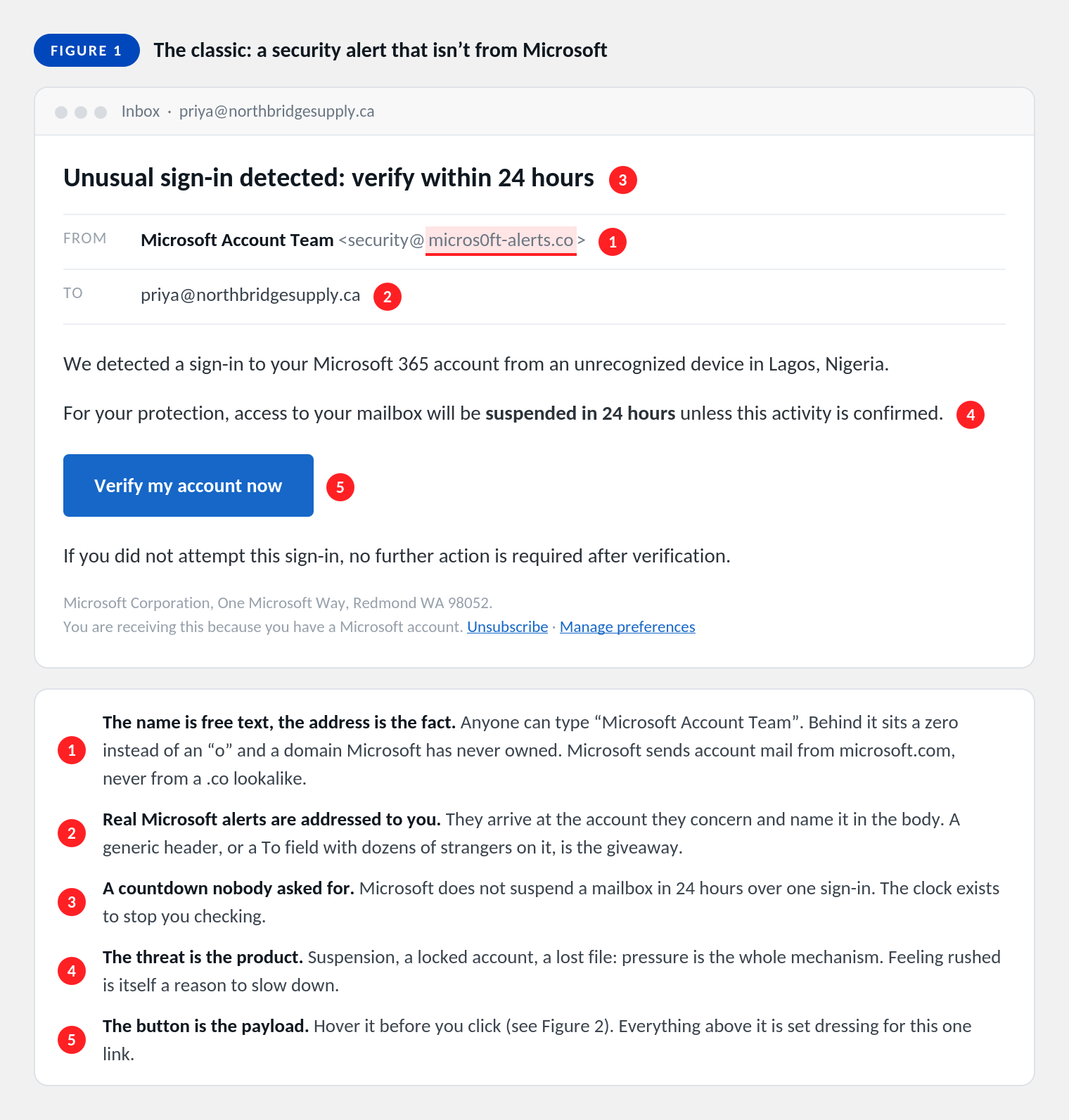
Rushed, worried, flattered, or singled out? That's the mechanism. Pressure exists to stop you checking, and it's engineered as deliberately as the fake logo. Deadlines, account warnings, an unusual request from someone senior, and "keep this between us" all earn a second look for the same reason.
This one catches the messages that pass every other test. A well-written supplier email with correct spelling, a real signature block and no suspicious links can still be fraudulent. What it can't do is remove the pressure, because without the pressure it doesn't work.
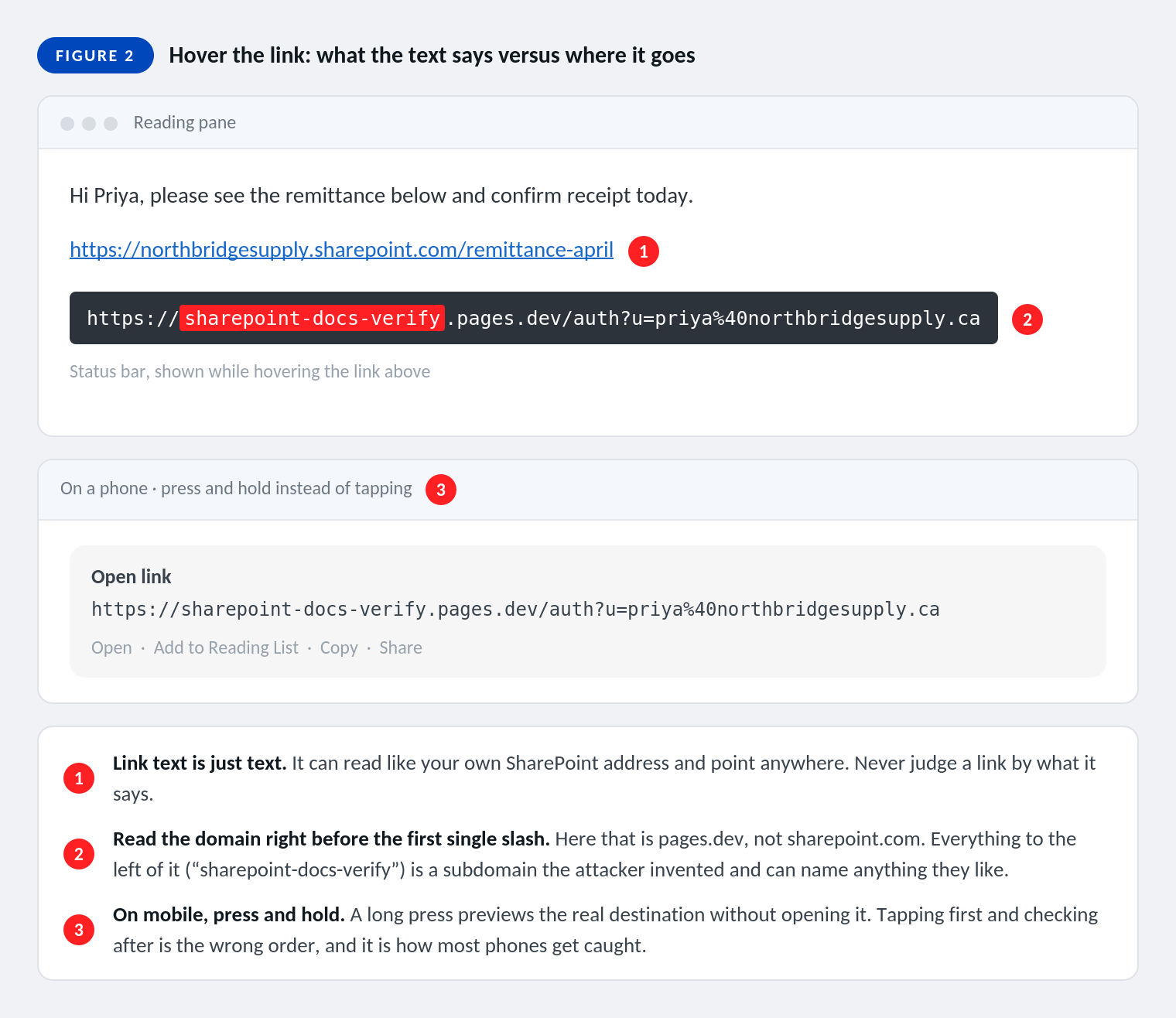
Your mail app will show you where a link actually goes, in the status bar on a computer, or with a long press instead of a tap on a phone. If the text says one company and the address says another, you have your answer without doing anything else.
One rule makes this readable: find the first single slash, then read the two words immediately to its left. That's the real domain. Everything before it is a subdomain the sender chose and can name anything at all, including the name of a company you trust.
An invoice you weren't waiting for, a .zip, an .html file described as a "secure document", or anything that asks you to enable content or sign in before it will open. None of those need opening to be checked. Send it to us and we'll open it somewhere it can't do any harm.
⚠ A PDF attachment is not proof of anything. Bank details, invoice totals and letterheads are as easy to fabricate in a PDF as in the body of an email, and attackers know a document feels more official than a paragraph.
Would this person really ask you this, in this way, through this channel? Your CEO doesn't buy gift cards by email. Your bookkeeper doesn't change payroll deposit details over text. A real request survives a quick call to a number you already had, and a fraudulent one never does, which is why the message will often give you a reason not to call.
The five checks handle the bulk of what arrives. These four are the ones that get past people who already know the basics, and they're worth studying properly.
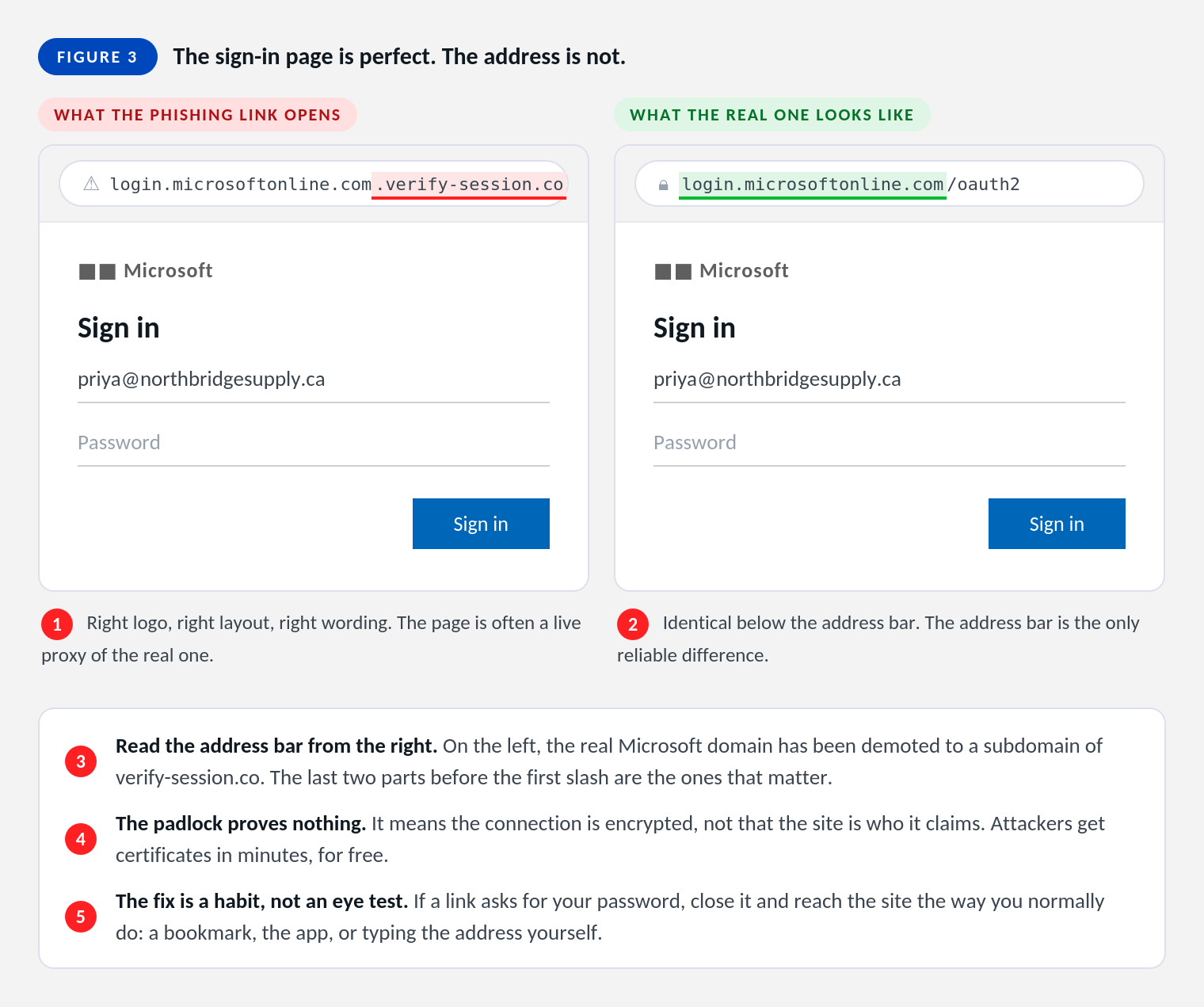
Right logo, right layout, right wording. Modern phishing pages are often a live proxy sitting between you and the genuine Microsoft sign-in, which is why they behave correctly: they pass your password through to Microsoft, pass the multi-factor prompt back to you, and quietly keep the session token that gets issued at the end. You are properly signed in, and so is the attacker.
This technique moved from specialist tooling to rented, point-and-click services over the past two years, and Microsoft 365 is the main target because one session unlocks email, SharePoint, OneDrive and Teams together. The defence isn't a sharper eye. It's the habit of never entering your password on a page a link opened for you.
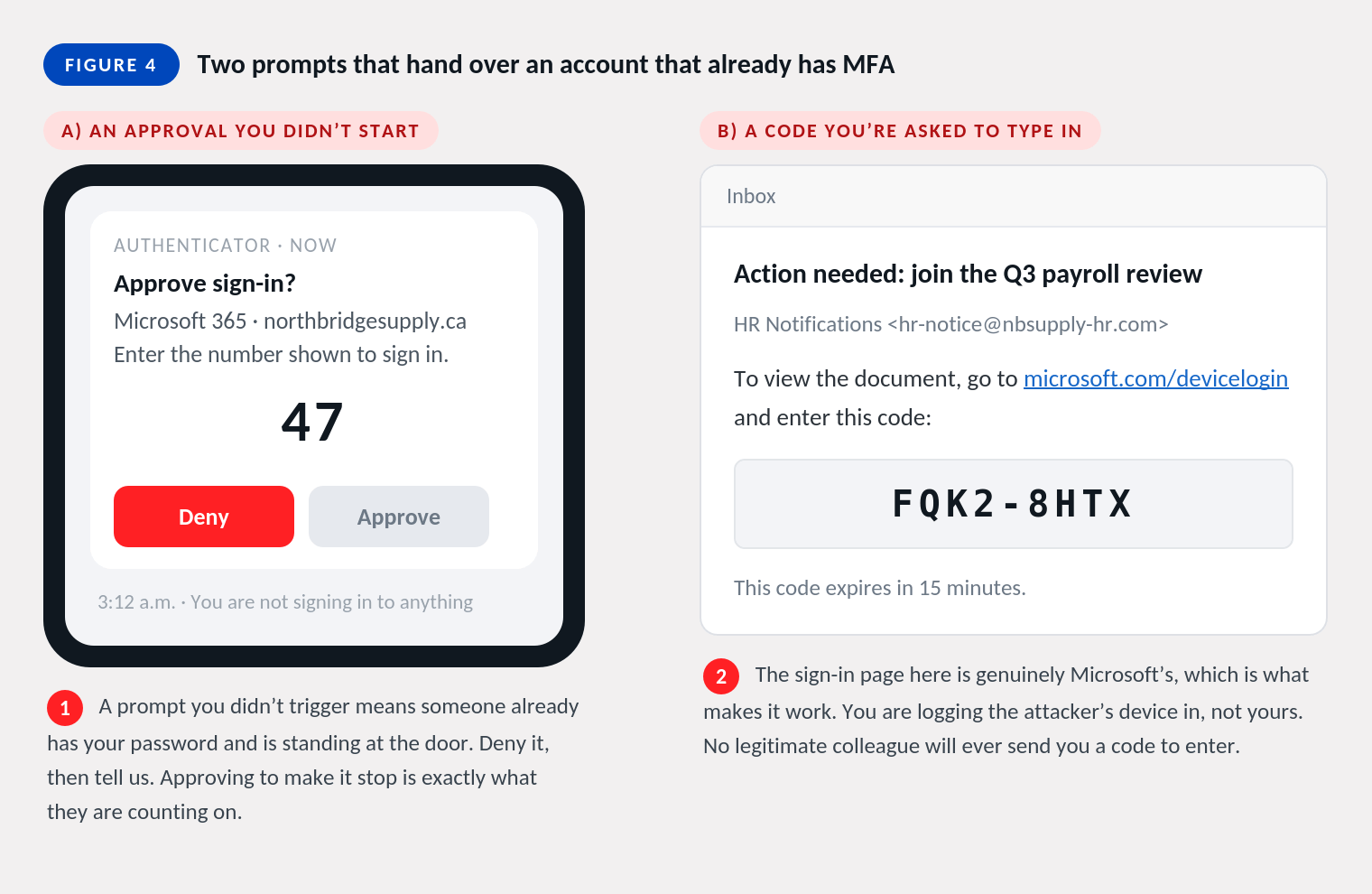
A multi-factor prompt arriving when you aren't signing in to anything means somebody already has your password and is standing at the door with it. Deny it and tell us the same day. Approving it to make the buzzing stop is the entire point of sending it at 3 a.m.
Its close relative is the code request: an email asking you to visit a genuine Microsoft address and type in a short code. The sign-in page really is Microsoft's, which is what makes it convincing, and the code signs in the attacker's device rather than yours. No colleague, supplier or IT provider will ever email you a code to enter.
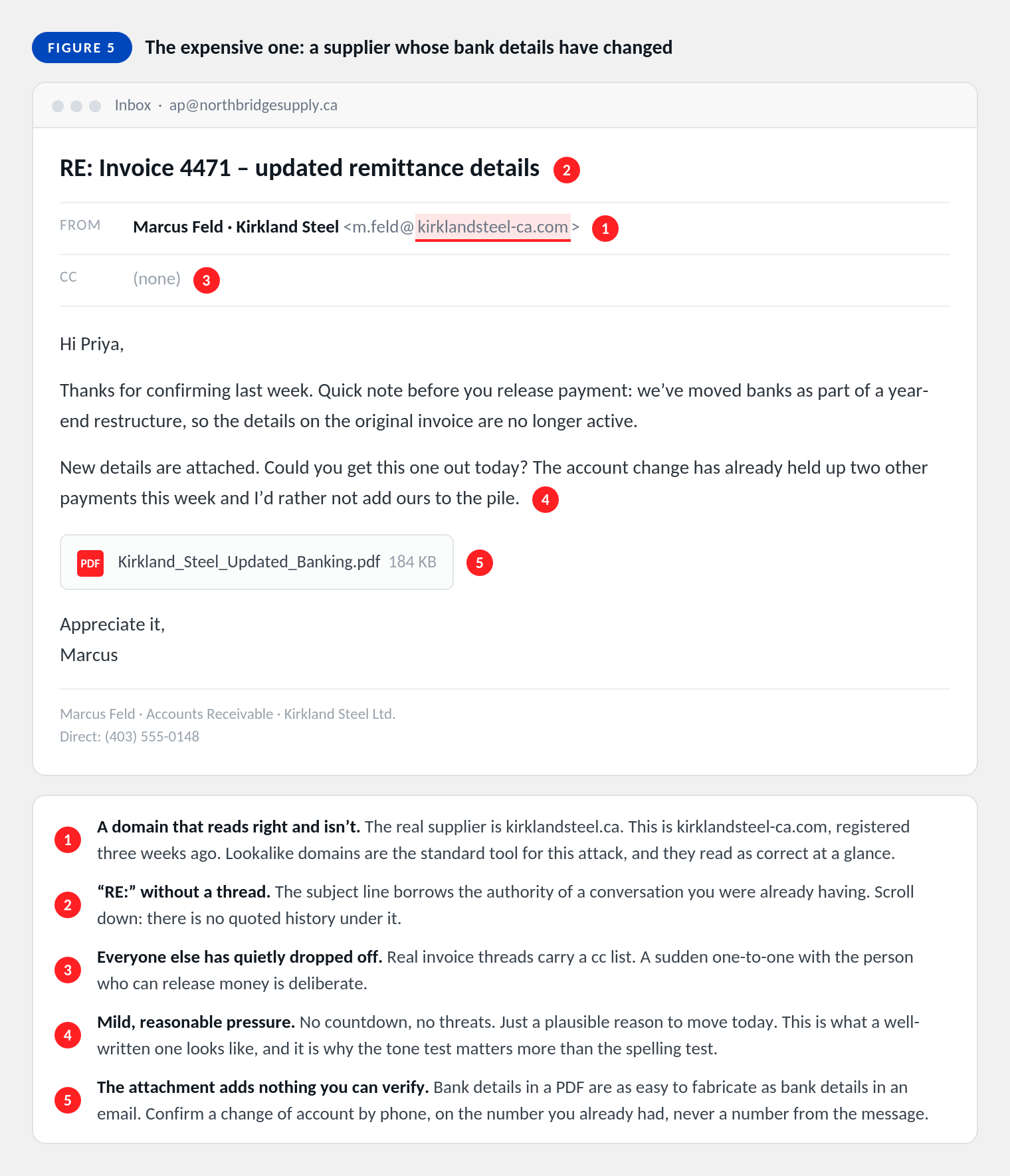
This is the expensive one. Spear phishing against Canadian businesses accounted for more than $43 million in reported losses in 2025 (CAFC, 2026), and it usually looks like an ordinary note from a supplier you deal with every month. Sometimes the sender's mailbox has genuinely been compromised, in which case the email arrives from the correct address, in the correct thread, in the supplier's own writing style.
There's only one control that reliably works here, and it isn't email. Any change to banking or EFT details gets confirmed by voice, on a number from your own records, before a payment goes out. Not the number in the signature block, and not the number on the attached letter.
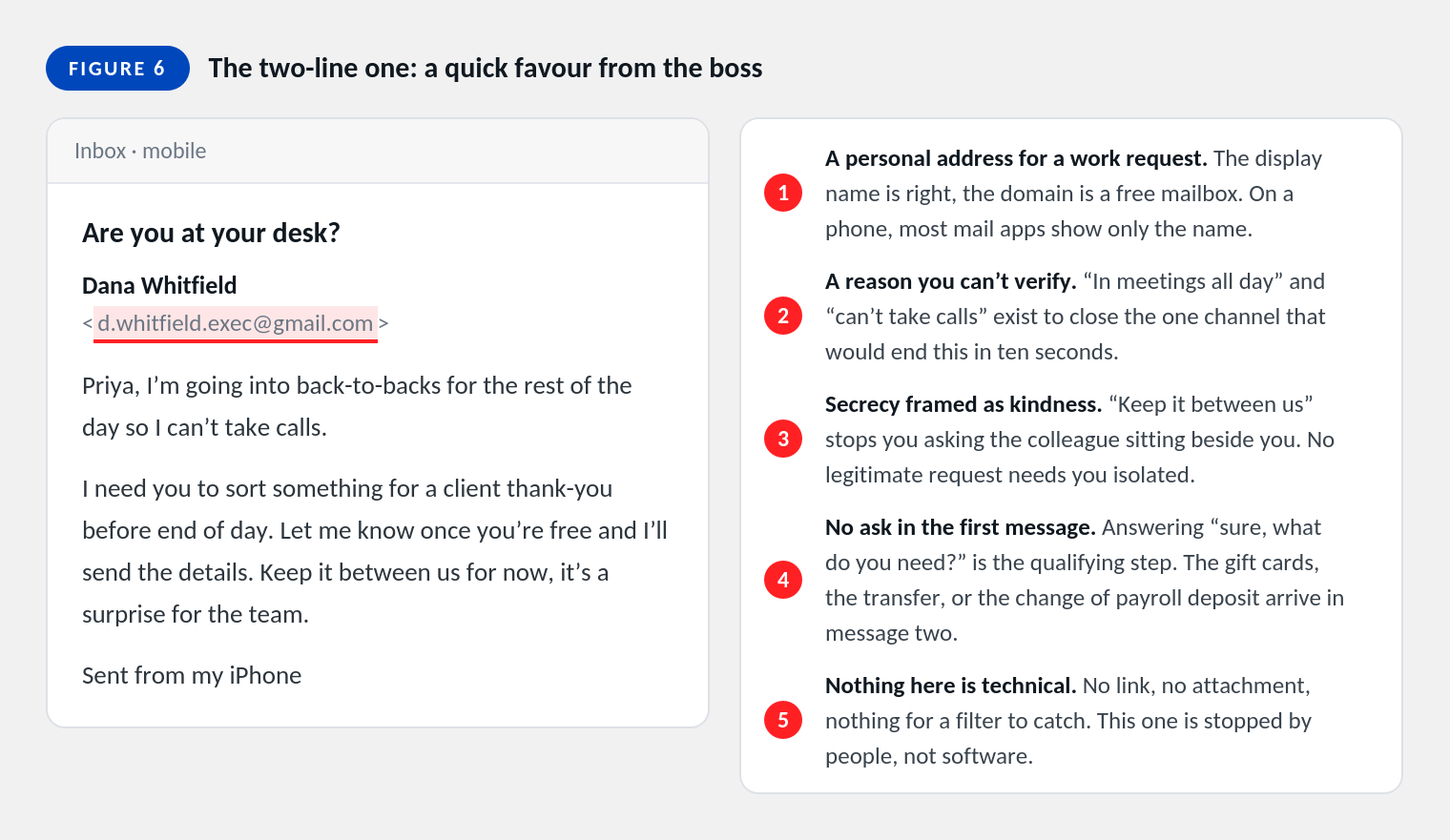
Short, friendly, and asking for nothing at all in the first message. "Are you at your desk?" is a qualifying question, and answering it moves you to the second message, which is where the gift cards, the urgent transfer or the change of payroll deposit shows up. There's no link and no attachment, so there's nothing for a filter to catch.
When you're unsure, run down this list rather than trying to form an overall impression. Impressions are what the attacker designed for.
Nothing here is a telling-off, and the order matters more than the speed. Work down the list.
🚨 Changing your password isn't enough on its own after a fake sign-in page. If the attacker captured a session, they stay signed in until that session is revoked and the account is checked for hidden mailbox rules. That part is on us, and it's why telling us matters even when you've already reset it yourself.
Ten-second checks are the last line, not the first one. Most of what's described above should be handled before anyone has to make a judgement call, and where it can't be prevented outright it should at least be obvious.
💡 If you're not sure which of these you currently have, that's a reasonable answer and a good place to start a conversation. Most of them are configuration rather than new spend.
Almost never. Opening and reading a message is safe on any current mail app. The risk lives in what you do next: clicking a link, opening an attachment, entering a password, or replying. Reading it and then asking us is exactly the right sequence.
Not on anything suspicious. On genuine marketing mail, unsubscribe works fine. On a phishing message, the unsubscribe link is just another link the attacker controls, and it confirms that a real person read the email. Delete it, or send it to us first.
It covers a great deal and you should absolutely keep it. What it doesn't stop is the proxy sign-in page described above, which captures the session after the multi-factor step succeeds. Codes and push approvals can be relayed. Passkeys and hardware keys can't be, which is why we move the highest-risk accounts onto them first.
Usually because there was nothing to catch. A two-line email from a free mailbox asking whether you're at your desk contains no link, no attachment and no malware. Filtering removes the industrial volume, and it does that well. The messages written specifically for your business are the ones that reach a person, and that's by design rather than by failure.
Forward it as an attachment if your mail app offers that, because it preserves the information we need to trace it. If that's awkward, a plain forward is completely fine. Please don't reply to the sender, click anything in it, or try to unsubscribe first.
Yes, provided the goal is measuring reporting rather than catching people out. Simulations that name and shame make everyone slower to admit a real click, which is the opposite of what you want. We run them as a training tool, and the number we care about is how quickly a suspicious message gets reported.
Forward it as an attachment if you can, and don't reply, click, or unsubscribe. We would far rather check a hundred safe emails than miss one, and you're never wasting our time by asking.
Would your team know what to do with the email in Figure 5? Always Beyond configures the Microsoft 365 controls that stop most of this before it lands, runs the awareness training that handles the rest, and picks up the phone when someone isn't sure. Reach out to start the conversation.
See exactly how your current IT setup measures up to our Hack Free standards. Enter your business email to receive:
