
Shawn Freeman
CEO


Every morning at 6:00 a.m., before I have opened my laptop, an email lands in my inbox. It tells me who I am meeting today, what we discussed last time, which files we shared, and who the new faces in the room are. I did not write it. I did not ask for it that morning. A small automated workflow built it while I was asleep.
That workflow runs on Copilot Cowork, the agent Microsoft added to Microsoft 365 Copilot. It reached general availability in June 2026, and I have been using it daily since the preview. Most of what you read about AI agents is either hype or fear. What I rarely see is the boring middle: small, specific, repeatable workflows that quietly remove friction from a normal workday.
So here are the four I actually use, every day, at Always Beyond. None of them is impressive on its own. That is exactly the point, and I will come back to it. I will also cover what Cowork costs, how it differs from the Copilot chat you may already have, and what Canadian businesses should check before turning it on.
If you have used Copilot chat in Word or Teams, you know the pattern: you ask a question, it gives you an answer or a draft, and then you do the work. Cowork is different. You describe an outcome, and it plans the steps, works across Outlook, Teams, SharePoint, and your files, and comes back with the finished result. It runs in Microsoft's cloud, so tasks keep moving even when your laptop is closed.
Two details matter for business owners. First, Cowork pauses at checkpoints and asks for your approval before it does anything consequential, like sending an email. You stay in control. Second, everything it does happens inside your Microsoft 365 environment, following the same permissions, security policies, and audit trails your tenant already enforces.
💡 Interesting footnote: Microsoft built Copilot Cowork in partnership with Anthropic, using the technology behind Claude Cowork. It is a multi-model system, which means Microsoft routes each task to whichever AI model handles it best.
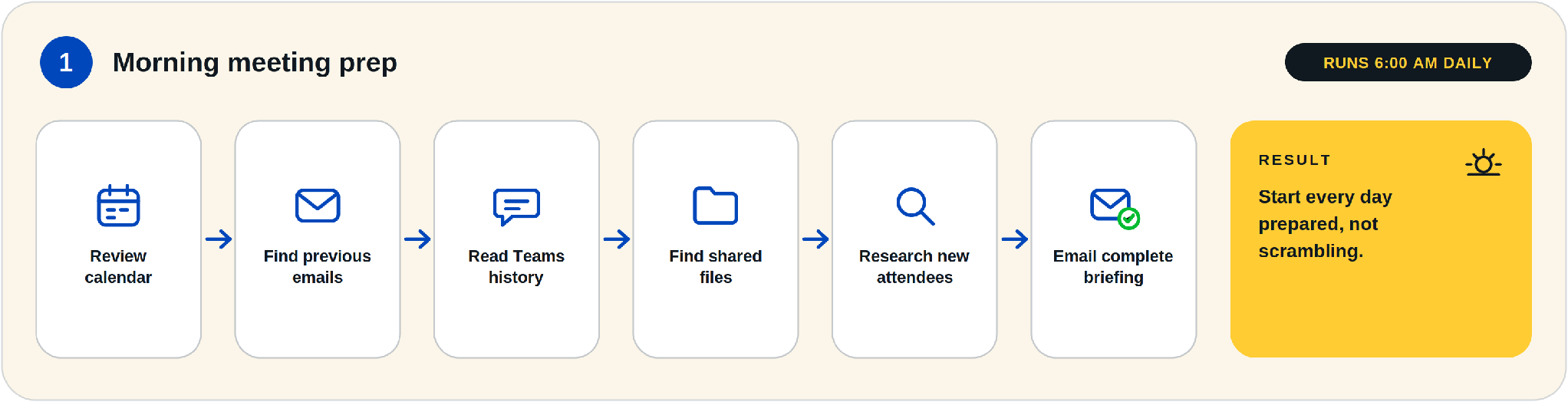
This is the one I described in the opening. Every morning at 6:00 a.m., a scheduled prompt kicks off. Cowork reviews my calendar for the day, pulls the email threads connected to each meeting, reads the relevant Teams history, finds the files we have shared back and forth, and researches any attendees I have not met before. Then it emails me a single briefing.
The result is simple: I start every day prepared instead of scrambling through Outlook at 7:45 trying to remember where a conversation left off. For anyone who runs six or more meetings a day, this alone changes the texture of a morning.
✅ Cowork supports scheduled prompts, so recurring tasks run automatically. A daily briefing is the easiest first workflow to set up because it requires no judgment calls and touches nothing outbound.

When a Teams meeting ends, Cowork reads the transcript, drafts the follow-up email, attaches the documents we referenced, and saves the whole thing to my drafts folder. It never sends anything. I open the draft, spend thirty seconds reviewing it, adjust a line or two, and hit send.
Follow-up emails are one of those tasks that are individually trivial and collectively brutal. Writing a good one from a one-hour meeting takes ten to fifteen minutes of replaying the conversation in your head. Multiply that across a week of client calls and you have found several lost hours. Reviewing a draft that already knows what was said takes a fraction of that.
⚠️ Keep the human in the loop. We configure follow-ups to land in drafts, never to auto-send. A follow-up that misquotes a commitment or attaches the wrong version of a proposal costs far more than the minutes the automation saves.
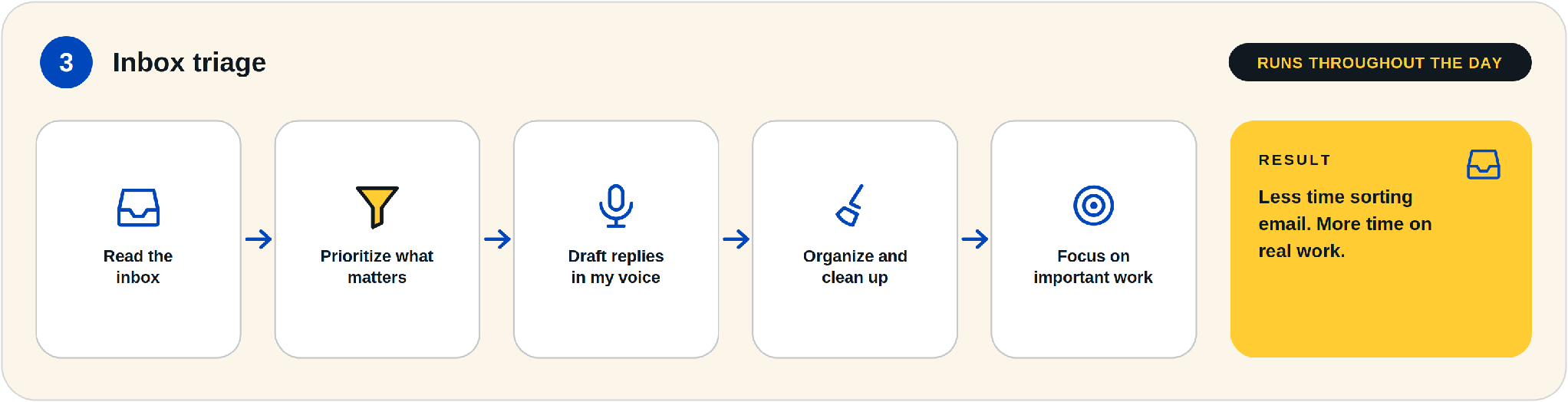
Throughout the day, Cowork reads incoming mail, surfaces the messages that actually need me, drafts replies in my voice for the routine ones, and files or archives the rest. My inbox stops being a to-do list someone else wrote for me and becomes a short queue of decisions.
The phrase "in my voice" is doing real work there. Cowork learns tone from your sent mail, and you can sharpen it further with a skill, which is a reusable set of instructions that captures how you want something done. Mine includes things like: keep replies short, no corporate filler, always propose a specific time instead of asking "when works for you."
✅ Start triage in observation mode for a week. Let it sort and draft without acting on anything, then review what it got right. You will learn its blind spots before they cost you a mishandled message.

This one is for anyone who sells. After a sales call, Cowork scans the conversation for competitor mentions. If a prospect says "we're also looking at so-and-so," that is valuable intelligence, and in most companies it evaporates the moment the call ends. Cowork checks whether we already have a battlecard for that competitor. If we do, it updates the card with what was said: objections raised, pricing hints, features the prospect liked. If we do not, it creates a new one and files it in our shared library.
The compounding effect is the point. Our sales knowledge base gets a little sharper after every single conversation, without anyone doing data entry. Six months in, a new team member joining a deal can read a battlecard that reflects dozens of real conversations, not a marketing page from the competitor's website.
📋 The workflow in one line: call ends, scan for competitor mentions, update the existing battlecard or create a new one, save to the shared library. Every step runs without a human touching it, and the output is a document your whole team can see.

Here is the honest part. None of these four workflows would justify buying Copilot Cowork by itself. A morning briefing is nice. Drafted follow-ups are nice. Nobody signs a purchase order for nice.
But together, they hand me back several hours every week, and they hand them back in the worst places: the frantic pre-meeting scramble, the 9 p.m. follow-up backlog, the inbox that eats the first hour of every day. That is time that goes back into strategy, clients, and the parts of the business only a human can do.
This is the pattern I would encourage any business owner to look for. Do not hunt for one dramatic AI use case that transforms everything. Hunt for four or five small, boring, repeatable frictions and remove them. The dramatic result shows up in the aggregate.
Cowork is not a separate product you buy off a shelf. It is a capability inside Microsoft 365 Copilot, with its own usage-based billing on top. Here is how the pieces fit, and how Cowork compares to the other Copilot options you may already have.
The licensing picture in plain terms: each user needs a Microsoft 365 Copilot licence, which is an add-on to a qualifying Microsoft 365 business plan. Cowork usage is then billed on top through Copilot Credits, where the cost of each task depends on the model used, the context it retrieves, the tools it calls, and how long it runs (Microsoft, 2026). Light users pay little. Heavy automation costs more. Microsoft sets pricing in USD, so budget with the exchange rate in mind.
⚠️ Usage-based billing needs a governance conversation before rollout, not after the first invoice. Set expectations on who gets access, which workflows are approved, and how spend is monitored. Always Beyond builds these controls into every Copilot deployment we run.
An agent that reads your email, meeting transcripts, and files is only as safe as the permissions underneath it. Cowork respects your existing Microsoft 365 permissions, which sounds reassuring until you remember that most organizations have permission sprawl they have never audited. If an employee technically has access to a folder of HR records because of a group membership from 2022, their Cowork does too.
Four things we check before enabling Cowork for any client:
🚨 Do not enable an AI agent tenant-wide on day one. Every oversharing problem, stale permission, and mislabelled folder you have ignored for years becomes instantly searchable by every licensed user. Clean house first.
Not in a standard Business Standard or Business Premium plan. You need the Microsoft 365 Copilot add-on licence per user, and Cowork tasks are then billed on usage through Copilot Credits. Your admin also has to enable Cowork in the Microsoft 365 admin centre before anyone sees it.
No. Cowork pauses at approval checkpoints before consequential actions, and you can configure workflows conservatively on top of that. Every workflow in this post that produces outbound communication saves to drafts for human review.
Cowork operates inside your Microsoft 365 trust boundary and inherits the same enterprise data protection, compliance policies, and audit logging as the rest of Copilot. Your prompts and files are not used to train the underlying models. That said, the practical risk for most businesses is internal oversharing, not data leaving Microsoft. That is why we start every deployment with a permission review.
No, and I would advise against starting with all four. The morning briefing is the safest first step because it is read-only and touches nothing outbound. Run it for two weeks, learn how the agent behaves with your data, then add the next workflow.
Yes. This is exactly the kind of project Always Beyond runs end to end: licensing, permission cleanup, workflow design, the approval and audit configuration, and training your team on reviewing agent output. You bring the frictions worth removing. We handle everything between there and a working deployment.
Curious what a few reclaimed hours a week would be worth in your business? Always Beyond scopes, licenses, and deploys Microsoft 365 Copilot and Cowork for Canadian businesses, from permission cleanup to your first working workflows. Reach out to start the conversation.
See exactly how your current IT setup measures up to our Hack Free standards. Enter your business email to receive:
