
Shawn Freeman
CEO


When your email stops working at 9 AM on a Monday, your accounting software crashes before payroll, or a team member can't access shared files during a client presentation, you need help fast. That's where an IT help desk comes in. It's not just a phone number to call when things break-it's the frontline support system that keeps your technology running smoothly, your team productive, and your business moving forward. For small and medium-sized businesses, understanding what an IT help desk actually does and how to leverage it effectively can mean the difference between costly downtime and seamless operations.
An IT help desk serves as the single point of contact for all technology-related issues within your organization. Think of it as your tech support command center, where trained professionals troubleshoot problems, answer questions, and resolve issues ranging from password resets to network outages.
The core functions include:
Unlike traditional break-fix IT support that only responds when something goes wrong, a modern IT help desk operates proactively. It monitors your systems, identifies potential problems before they escalate, and maintains comprehensive records of recurring issues to prevent future disruptions.
Consider what happens when your team lacks reliable IT support. An employee spends 45 minutes trying to fix a printer issue instead of serving customers. Your manager wastes two hours troubleshooting a software glitch that a professional could resolve in ten minutes. Your entire office loses productivity for half a day when the network goes down and nobody knows who to call.
These aren't hypothetical scenarios-they're daily realities for businesses without structured IT help desk support. According to industry research, the average employee loses 20% of their productive time dealing with technology issues when proper support isn't available.
Implementing effective help desk best practices starts with understanding what makes support truly valuable for your business.
A well-organized IT help desk uses multiple support levels to handle issues efficiently:
| Support Tier | Function | Examples |
|---|---|---|
| Tier 1 | Initial contact, basic troubleshooting, password resets | Account lockouts, printer setup, basic software questions |
| Tier 2 | Advanced technical issues, escalated problems | Network connectivity, application errors, hardware failures |
| Tier 3 | Specialized expertise, complex infrastructure | Server issues, security incidents, custom integrations |
This tiered approach ensures simple problems get solved immediately while complex issues reach the right specialist without delay. When you work with a managed IT service provider, you gain access to all three tiers without needing to hire multiple full-time technicians.
Speed matters when technology fails. Every minute your team can't work costs money and creates frustration. Effective IT help desks establish clear service level agreements (SLAs) that define exactly when you'll receive help.
Critical SLA components include:
At Always Beyond, we've eliminated the frustration of waiting hours for callbacks by providing genuinely responsive support that treats your urgent issues with the priority they deserve. No long-term contracts mean we earn your business every single day through performance, not paperwork.
Not every technical question requires a phone call. Building comprehensive self-service resources empowers your team to solve common problems independently while freeing up help desk staff for complex issues.
A good knowledge base includes:
This doesn't mean leaving employees to fend for themselves. It means giving them options-solve it now with a quick article or call the help desk for immediate assistance.
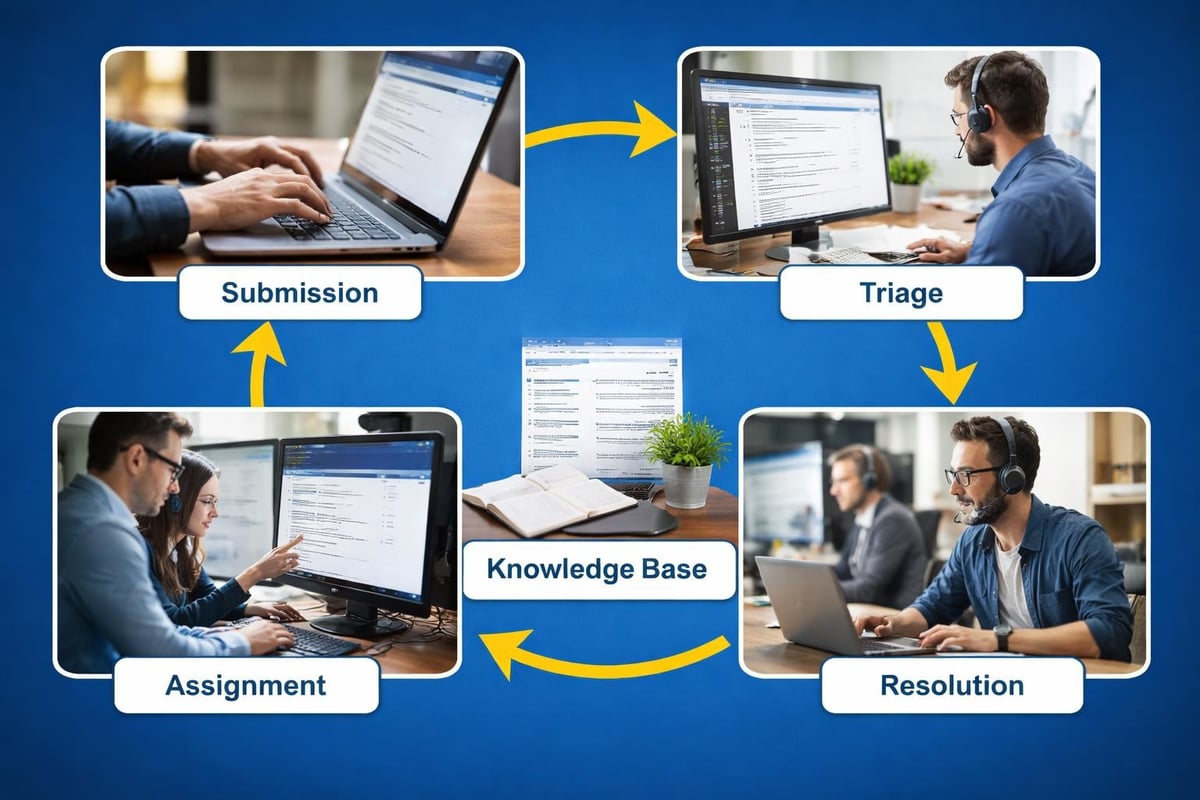
Understanding the workflow helps you maximize the value you get from help desk support.
When someone reports an issue, it creates a ticket-a documented record that tracks the problem from start to finish. This isn't bureaucracy for its sake. It ensures nothing gets forgotten, establishes accountability, and creates searchable history when similar issues arise later.
Here's what happens when you submit a ticket:
This structured approach transforms chaotic "did you call IT about that thing?" conversations into organized, trackable support that actually gets problems solved.
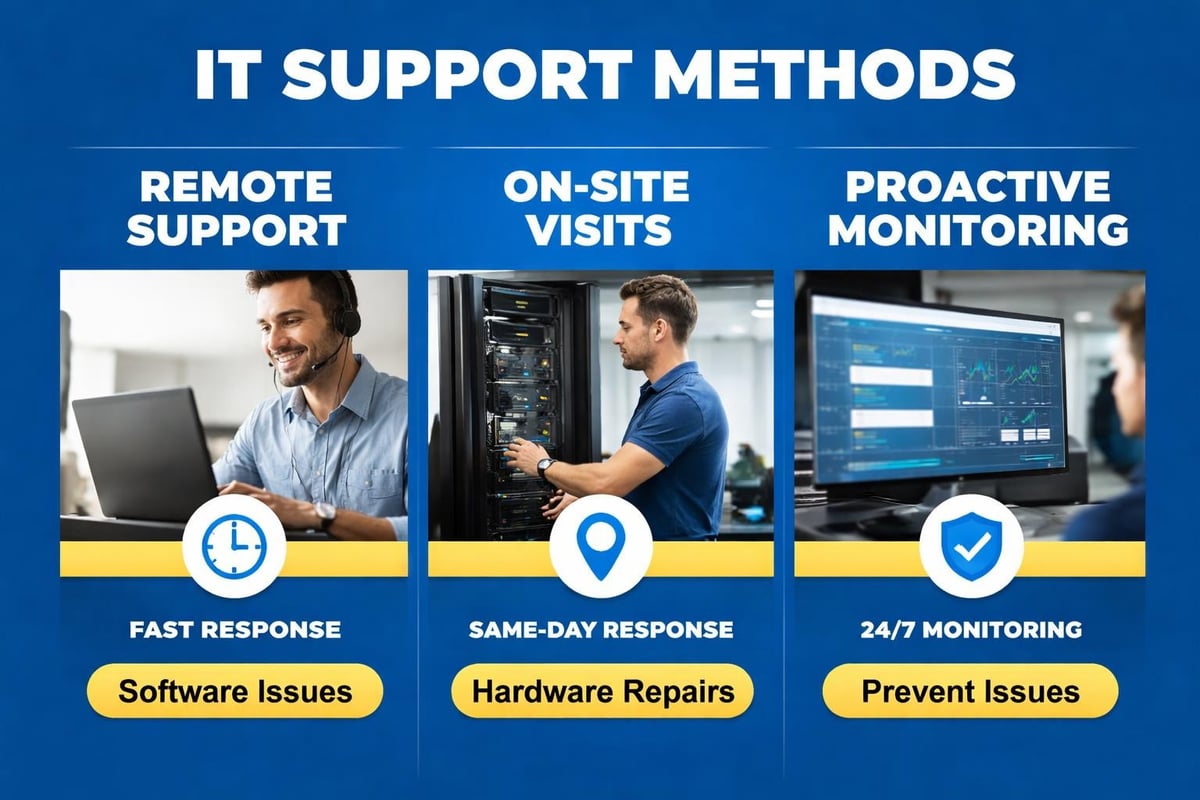
Modern IT help desks handle most issues remotely using secure tools that let technicians access your computer (with permission) and fix problems without traveling to your office. This means faster resolution-often within minutes instead of hours or days.
On-site visits happen when physical intervention is necessary: installing new hardware, troubleshooting network equipment, or dealing with issues that can't be diagnosed remotely. A flexible provider offers both options seamlessly.
Should you hire an in-house IT person or work with an external help desk provider? The answer depends on your business size, budget, and complexity.
Hiring internal IT staff makes sense for larger organizations with complex, specialized systems and the budget to support dedicated technology employees.
Advantages:
Challenges:
For most small businesses, the economics don't work. A single IT professional costs $60,000-$90,000 annually before benefits, yet provides expertise in only certain areas and has no backup when unavailable.
Partnering with a managed IT services provider gives you an entire team of specialists for a predictable monthly cost-typically far less than one full-time salary.
| Feature | In-House IT | Outsourced Help Desk |
|---|---|---|
| Cost | $60K-$90K+ per year | $150-$250 per user per month |
| Expertise breadth | Limited to one person's skills | Full team with diverse specializations |
| Availability | Business hours only | Extended or 24/7 coverage available |
| Backup coverage | None without additional hires | Built-in team redundancy |
| Latest technology knowledge | Depends on individual training | Continuous team-wide training |
| Mac support | Often limited | Specialized expertise available |
Always Beyond specializes in supporting businesses that use modern platforms like Google Workspace and Mac computers-areas where traditional IT providers often struggle. Our team stays current with the latest technology without requiring you to fund ongoing training.
Tracking the right metrics helps you evaluate whether your IT help desk delivers real value.
First-call resolution rate: What percentage of issues get solved during the initial contact? Higher is better-it means faster solutions and less frustration.
Average response time: How quickly does someone acknowledge your ticket? Industry best practice suggests under 15 minutes for critical issues.
Customer satisfaction scores: Are your employees happy with the support they receive? This subjective measure often reveals more than raw numbers.
Mean time to resolution: How long does it take to completely solve problems? Track this by issue category to identify patterns.
Don't get lost in vanity metrics that sound impressive but don't impact your business. The number of tickets closed matters less than whether your team can work productively without technology frustrations.
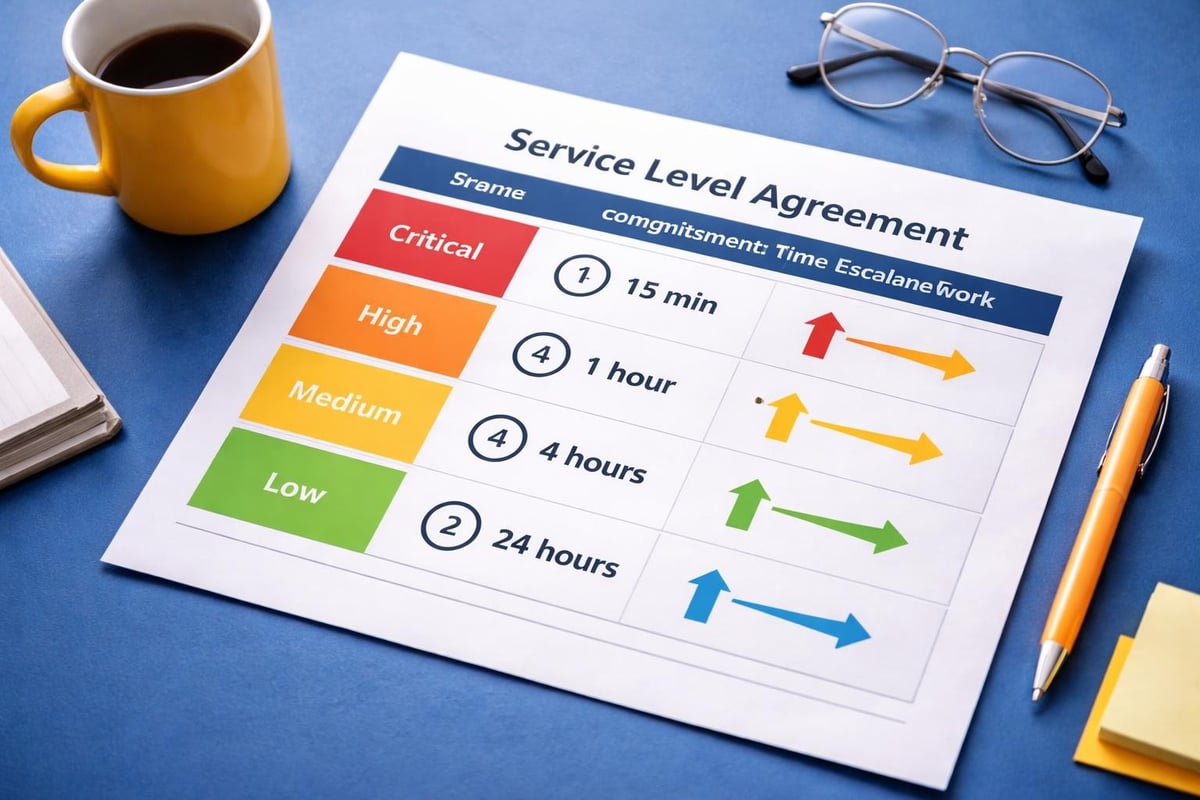
Establishing clear SLAs creates mutual accountability. You know what to expect, and your provider commits to specific performance standards.
Priority-based response framework:
These timeframes represent industry standards. The right provider consistently meets or exceeds them without making excuses.
As your business evolves, your IT help desk should offer more than reactive problem-solving.
The best IT help desks identify and fix issues before you notice them. Automated monitoring watches your servers, network equipment, backup systems, and critical applications 24/7, alerting technicians to problems during early warning stages.
This proactive approach prevents the disasters that disrupt your business. A failing hard drive gets replaced before it crashes. A security vulnerability gets patched before hackers exploit it. A backup failure gets corrected before you need to restore lost data.
When you're evaluating managed IT services near you, ask specific questions about their monitoring capabilities. Generic answers like "we watch your systems" aren't enough. You want details about which monitoring tools they use and what specific metrics they track.
Your IT help desk and cybersecurity efforts shouldn't operate in separate silos. Effective support teams recognize security implications in everyday issues-unusual login attempts, suspicious emails, unexpected software behavior.
This integrated approach means your help desk acts as an early warning system for cybersecurity threats while maintaining the convenience and accessibility employees need.
Security-conscious help desk practices include:
Always Beyond treats every support interaction as an opportunity to strengthen your security posture without creating frustrating barriers that slow down your team.
Behind every effective IT help desk runs sophisticated help desk software that manages tickets, tracks metrics, and maintains knowledge bases.
Ticket management system: Centralizes all support requests with assignment, tracking, and escalation capabilities.
Knowledge base integration: Connects support tickets to documented solutions, making recurring issues easier to solve.
Remote support tools: Enables technicians to access user systems securely for faster problem resolution.
Reporting and analytics: Provides insights into support performance, common issues, and improvement opportunities.
Mobile accessibility: Allows technicians to respond to urgent issues from anywhere, not just the office.
Omnichannel support options: Accepts requests via email, phone, chat, and web portal-whatever works best for different users and situations.
The specific platform matters less than how well your IT provider uses it. Advanced software poorly utilized delivers worse results than basic tools used expertly.
Modern help desk systems incorporate automation and AI to speed up routine tasks without eliminating the human expertise that complex problems require.
Intelligent routing sends tickets to the right technician based on issue type and expertise. Automated responses acknowledge requests immediately and provide relevant knowledge base articles. Chatbots handle basic questions outside business hours, escalating to human technicians when necessary.
These technologies enhance support-they don't replace the experienced professionals who understand your business and solve nuanced problems.
Abstract descriptions don't capture how help desk support actually helps your daily operations. Let's look at specific situations where having responsive IT help desk support makes a tangible difference.
Your office manager arrives Monday morning to find her Outlook isn't syncing. She has urgent emails to send before a 10 AM deadline, but nothing's loading.
Without proper help desk support: She spends 30 minutes trying random fixes from Google searches. Calls the IT person who doesn't answer because they're helping someone else. Finally reaches someone at 9:45 AM who says they'll "look into it" but can't help immediately. Deadline missed.
With responsive help desk support: She submits a ticket at 8:15 AM. Receives automated acknowledgment immediately. Technician remote-connects at 8:25 AM, identifies a corrupted OST file, and has her back online by 8:40 AM. Deadline met with time to spare.
An employee receives a convincing-looking email appearing to be from your bank, asking them to verify account information by clicking a link and entering credentials.
Without integrated security support: Employee clicks the link, enters information, and unknowingly compromises credentials. Attackers use those credentials later to access your network and deploy ransomware.
With security-aware help desk: Employee forwards the suspicious email to the help desk before clicking. Security team confirms it's phishing, blocks the sender domain across your organization, and uses the incident as a teaching moment to reinforce security awareness company-wide.
You've hired a new team member starting Monday. They need a computer, email account, access to shared drives, and software installations to be productive from day one.
Without organized help desk processes: IT person scrambles Friday afternoon to find available hardware, forgets to create the email account, and spends the new hire's first morning installing software while they sit idle.
With proactive help desk management: Ticket created when HR confirms the hire. Automated workflow triggers hardware preparation, account creation, and software pre-installation. New hire arrives to find everything ready, making a positive first impression and starting productively immediately.
These scenarios illustrate why help desk support isn't a luxury-it's essential infrastructure that protects productivity, security, and your business reputation.
Not all IT help desks operate the same way. At Always Beyond, we've built our support model around what small businesses actually need, not what traditional IT companies find easiest to deliver.
We don't require long-term contracts because we're confident you'll stay because of the value we deliver, not because of legal obligations. This approach keeps us accountable-we earn your business every month through responsive, effective support.
If we're not meeting your needs, you're free to make a change. That risk keeps us focused on your satisfaction in ways that locked-in contracts never could.
Many IT providers struggle with Mac computers and Google Workspace because they've built their expertise around Windows and Microsoft. We embrace the platforms modern businesses actually use.
Whether your team works on MacBooks, relies on Google Workspace for collaboration, or mixes platforms across your organization, our technicians provide equally expert support for all of them.
Technology serves people, not the other way around. We explain technical issues in plain language, never making you feel foolish for asking questions. Our goal isn't to impress you with jargon-it's to solve your problems and get you back to running your business.
This human-first approach extends to how we handle frustrating situations. When you're stressed about a technology failure, you need empathy and solutions, not lectures about what you should have done differently.
An effective IT help desk transforms technology from a source of frustration into a competitive advantage that keeps your business running smoothly. The right support model-whether you choose comprehensive managed IT services or targeted help desk assistance-provides the expertise, responsiveness, and proactive care that busy business owners need without the overhead of building internal IT departments. Ready to experience IT support that actually works the way you need it to? Always Beyond offers responsive, human-first IT help desk services with no long-term contracts required, because we believe you should stay with us because we're great, not because you're stuck.
See exactly how your current IT setup measures up to our Hack Free standards. Enter your business email to receive:
