
Shawn Freeman
CEO


Managing who can access what in your business technology environment is one of the most critical decisions you'll make as a business owner. Poor IT access management doesn't just create security vulnerabilities-it leads to productivity bottlenecks, compliance headaches, and the kind of late-night panic calls nobody wants to receive. Whether you're a 15-person marketing agency or a 100-employee manufacturing firm, getting IT access right means balancing security with usability, and that's where many businesses struggle.
IT access refers to the permissions, credentials, and controls that determine who can use your technology systems, what data they can view or modify, and which applications they can access. It's the digital equivalent of handing out keys to your office-except these keys can unlock everything from customer databases to financial records to proprietary business information.
The challenge most small and medium-sized businesses face is that IT access management has become exponentially more complex. Ten years ago, you might have managed access to a few desktop computers and a file server. Today, you're juggling cloud applications, mobile devices, remote workers, contractor access, and integration points between dozens of different platforms.
When IT access isn't managed properly, the consequences show up quickly. Consider these common scenarios that business owners face:
According to best practices for user access controls, organizations that implement structured access management reduce security incidents by up to 60% while simultaneously improving employee productivity. The key is treating IT access as a strategic business function, not just a technical checkbox.

The foundation of effective IT access management starts with understanding the principle of least privilege. This concept means giving each person exactly the access they need to do their job-nothing more, nothing less. It sounds simple, but implementation requires thoughtful planning and ongoing maintenance.
Core components of a robust IT access framework include:
When Always Beyond works with new clients, we often discover that their biggest IT access challenge isn't technology-it's process. Many businesses have never documented who should have access to which systems, which makes consistent enforcement impossible.
Role-based access control simplifies IT access management by creating permission templates based on common job functions. Instead of configuring access for each individual employee, you define roles like "Sales Team Member," "Finance Manager," or "IT Administrator," then assign people to these roles.
| Role Type | Typical Access Level | Example Systems |
|---|---|---|
| Basic User | Email, shared drives, communication tools | Microsoft 365, Google Workspace, Slack |
| Department Staff | Role-specific applications, department data | CRM, project management, industry software |
| Manager | Team data, reporting tools, approval systems | Analytics platforms, HR systems, budgeting tools |
| IT Administrator | System configuration, user management, security tools | All systems, admin portals, security consoles |
This approach dramatically reduces the complexity of managing IT access as your team grows or changes. When someone gets promoted from sales representative to sales manager, you simply change their role assignment rather than manually adjusting dozens of individual permissions.
The CMS Access Control Handbook provides detailed guidance on implementing these controls in a way that meets regulatory requirements while remaining practical for day-to-day operations.
Passwords alone no longer provide adequate protection for IT access. With data breaches exposing billions of credentials over the past few years, multi-factor authentication has shifted from "nice to have" to "absolute necessity." MFA requires users to verify their identity through multiple methods-typically something they know (password), something they have (phone or security key), and sometimes something they are (fingerprint or face scan).
Benefits of implementing MFA across your organization:
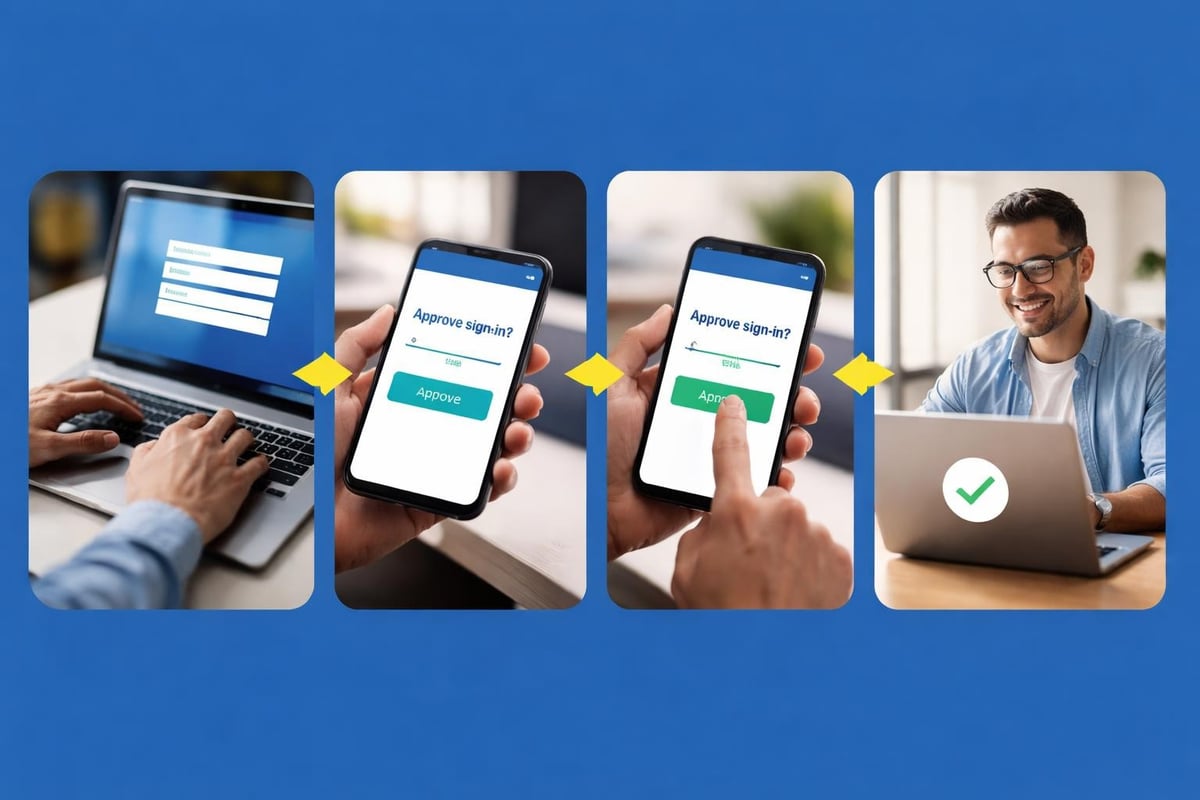
Implementing MFA doesn't have to disrupt your team's workflow. Modern MFA solutions use push notifications to mobile devices, making the verification process take just seconds. For systems that employees access frequently from trusted devices, you can configure MFA to remember those devices for a set period, balancing security with convenience.
For businesses using Microsoft 365 or Google Workspace, MFA capabilities are already built into your existing subscriptions. The challenge is configuring them properly and creating policies that protect your most sensitive IT access points without frustrating your team. This is where partnering with experts in managed IT services makes a tangible difference.
The shift to remote and hybrid work has fundamentally changed how businesses approach IT access. When employees work from coffee shops, home offices, and client sites, traditional perimeter-based security no longer applies. You need IT access controls that protect your data regardless of where your team members are located.
Zero trust security operates on the principle of "never trust, always verify." Instead of assuming that anyone inside your network perimeter is safe, zero trust requires continuous verification of IT access requests based on multiple factors including user identity, device health, location, and behavior patterns.
Implementing zero trust doesn't require a massive technology overhaul. Start with these practical steps:
For example, you might configure your systems so that accessing financial data from a known office device requires just a password and MFA, while the same access from a new device in an unfamiliar location triggers additional verification steps or even blocks access entirely until an administrator reviews the request.
Large enterprises have dedicated security teams to manage IT access around the clock. Small and medium businesses face the same threats but with a fraction of the resources. This creates unique challenges that require creative solutions.
Common IT access pain points for SMBs:
The good news is that cloud-based solutions have leveled the playing field. Modern identity and access management platforms provide enterprise-grade IT access controls at price points that work for smaller organizations. You don't need a massive budget to implement proper access controls-you need the right approach and expert guidance.
When conducting an IT audit, one of the first areas we examine is how IT access is managed. We consistently find that businesses have the right tools but haven't configured them optimally. Small adjustments to policies and settings can dramatically improve security without adding complexity for users.
Technology alone won't solve IT access challenges. You need clear policies that define how access is requested, approved, reviewed, and revoked. These policies should be documented, communicated to your team, and enforced consistently.
Your access policies should address these key areas:
| Policy Area | Key Questions to Address | Recommended Review Frequency |
|---|---|---|
| User Onboarding | What access do new hires receive? Who approves it? | Every hiring cycle |
| User Offboarding | How quickly is access revoked? Who confirms completion? | Immediately upon separation |
| Access Requests | How do employees request additional access? What's the approval process? | Quarterly |
| Password Requirements | What constitutes a strong password? How often must passwords change? | Annually |
| Access Reviews | Who reviews access permissions? How often? | Quarterly for privileged access, annually for standard users |
According to Loyola University's Access Control Policy, regular review cycles are essential for maintaining security. Access that made sense six months ago may no longer be appropriate based on role changes, project completion, or evolving security requirements.

Manual IT access management doesn't scale. As your business grows, the time required to handle access requests, conduct reviews, and maintain documentation grows exponentially. Automation transforms IT access from a time-consuming administrative burden into a streamlined process that actually improves security.
Key areas where automation delivers immediate value:
Modern identity platforms integrate with your existing systems to create automated workflows. For instance, when a new employee joins your sales team, automation can configure their email account, add them to the appropriate Microsoft 365 or Google Workspace groups, grant CRM access, and send them onboarding instructions-all without IT staff touching anything manually.
This level of automation not only saves time but also reduces errors. Human mistakes in IT access provisioning-like forgetting to remove access for a departed employee or accidentally granting excessive permissions-create security vulnerabilities. Automated systems follow consistent rules, maintaining your security posture even as your team changes.
IT access controls aren't separate from your cybersecurity strategy-they're a foundational element. The most sophisticated firewall or antivirus solution can't protect you if an unauthorized user has legitimate credentials to access your systems. This is why cybersecurity and access management must work hand in hand.
When we conduct cybersecurity risk assessments, we evaluate not just whether IT access controls exist, but whether they're configured and maintained effectively. We look for common vulnerabilities like orphaned accounts, excessive permissions, lack of MFA on privileged accounts, and insufficient logging of access events.
Effective IT access management includes continuous monitoring and regular auditing. You need visibility into who's accessing what, when they're accessing it, and from where. This information serves multiple purposes: detecting security incidents, meeting compliance requirements, and identifying opportunities to optimize access policies.
Critical access events to monitor and log:
These logs provide the forensic data you need if a security incident occurs. They also support compliance with regulations that require demonstrating appropriate IT access controls. As outlined in the U.S. Department of Education's Access Control Standard, maintaining comprehensive access logs is often a regulatory requirement, not just a best practice.
Investing time and resources into IT access management delivers measurable business value beyond just security improvements. When access controls work smoothly, your team becomes more productive, your IT support costs decrease, and your risk exposure drops significantly.
Consider the time savings alone. A business with 50 employees that manually manages access requests might spend 10-15 hours per week on access-related tasks: resetting passwords, troubleshooting permission issues, setting up new accounts, and removing access for departing employees. Automated IT access management can reduce this to 2-3 hours per week, freeing up IT resources for strategic projects.
From a risk perspective, the cost of a data breach far exceeds the investment in proper access controls. The average cost of a small business data breach in 2026 exceeds $150,000 when you factor in notification costs, legal fees, regulatory fines, and business disruption. Many of these breaches result from compromised credentials or excessive user permissions-problems that effective IT access management prevents.
Many small and medium businesses lack the internal expertise to implement comprehensive IT access controls. This is where partnering with an experienced IT service provider creates tremendous value. The right partner brings expertise in access management best practices, experience with the specific tools and platforms you use, and the capacity to handle both strategic planning and day-to-day administration.
When evaluating IT service providers for access management support, look for specific capabilities:
The flexibility to work without long-term contracts is particularly valuable when selecting an IT partner for access management. Your needs will evolve as your business grows and your technology environment changes. A provider that offers month-to-month engagement demonstrates confidence in their value and allows you to adjust services as needed without penalty.
Always Beyond's approach to IT access management combines strategic planning with hands-on implementation. We help businesses design access policies that make sense for their specific operations, implement the technical controls to enforce those policies, and provide ongoing monitoring and support to keep access management running smoothly. Our expertise with both Mac environments and Google Workspace, alongside Microsoft platforms, means we can support diverse technology stacks that many other providers struggle with.
IT access management isn't a one-time project-it's an ongoing process that requires regular attention and refinement. As your business adds new applications, expands into new markets, hires different types of workers (employees, contractors, seasonal staff), and faces evolving security threats, your access controls must adapt accordingly.
Schedule quarterly reviews of your IT access framework to assess what's working and what needs adjustment. These reviews should examine metrics like:
Use this data to continuously refine your policies, automate additional processes, and improve the balance between security and usability. The goal is creating an IT access environment that protects your business without creating unnecessary friction for your team.
Effective IT access management protects your business while enabling your team to work efficiently, regardless of where they're located or which devices they use. By implementing role-based access controls, requiring multi-factor authentication, automating routine tasks, and maintaining clear policies, you create a security foundation that scales with your growth. Always Beyond specializes in helping businesses implement practical, effective IT access controls that fit their specific needs-without long-term contracts or unnecessary complexity. Book a consultation to discover how we can strengthen your access management while reducing your IT burden.
See exactly how your current IT setup measures up to our Hack Free standards. Enter your business email to receive:
