
Shawn Freeman
Founder, CEO

The call comes in on a Tuesday morning. A vendor you have worked with for years emails your accounts payable team to let them know their banking details have changed. The email looks right. The name is right. The tone is right. Your AP team processes the next payment to the new account — and within hours, the money is gone.
This is not a hypothetical. It is happening to businesses of every size, across every industry, every single day. The FBI reports that Business Email Compromise has become a $55 billion USD scam over the past decade — Canadian businesses are not insulated from these losses, with the Canadian Anti-Fraud Centre reporting payment fraud as one of the top financial crimes affecting Canadian organizations, and 2024 saw it account for 73% of all reported cyber incidents — up from 44% just a year earlier. The average fraudulent wire transfer request is approximately $24,000–$25,000 USD — Canadian businesses are equally targeted, with losses reported to the Canadian Anti-Fraud Centre growing year over year. And in most cases, once the funds leave your account, recovery is extremely difficult or impossible.
The most dangerous version of this fraud — Vendor Email Compromise — does not even require your systems to be hacked. It requires your vendor's email to be compromised. And you have no control over that. What you do have control over is whether your finance team has the procedures, habits, and internal controls in place to catch it before a dollar moves.
This guide walks through exactly what those controls look like — and why the phone call that takes two minutes may be the most important thing standing between your business and a significant financial loss.
In a BEC attack, a fraudster impersonates someone your employees trust — typically a company executive, a known colleague, or an internal finance manager — to request an urgent wire transfer or payment. The email may come from a spoofed address that looks almost identical to the real one, or in more sophisticated cases, from an actual compromised account.
Common BEC scenarios your team needs to recognize include:
🚨 BEC attacks accounted for 73% of all reported cyber incidents in 2024, up from 44% in 2023. The FBI's Internet Crime Complaint Center reports losses exceeding $2.77 billion from BEC in 2024 alone — and those are only the incidents that were reported.
VEC is more dangerous and significantly harder to detect than standard BEC. Here, the fraudster does not impersonate anyone — they actually compromise a legitimate vendor's email account. They spend weeks or months reading that vendor's emails, learning invoice formats, billing cycles, communication tone, and which contacts at your company handle payments. Then, at precisely the right moment in your payment cycle, they send an email from the vendor's real account — with one change: the banking details have been updated.
Because the email comes from a real, authenticated account, standard email security tools do not flag it. Your AP team recognizes the sender. The language sounds like the vendor. And nothing looks wrong — until your vendor calls asking why their payment has not arrived.
⚠️ Vendor Email Compromise attacks rose 66% in the first half of 2024 and 137% in 2023. Your vendor's email security is not your responsibility to manage — but protecting your payments from their compromised account absolutely is.
The most important thing to understand about both BEC and VEC is this: you cannot rely on the email alone. A message that looks exactly like it came from your trusted vendor may have come from a fraudster who has been sitting in that vendor's inbox for two months. No amount of scrutinizing email headers or checking for typos will catch a message sent from the vendor's actual, legitimate email account.
The only reliable defense is out-of-band verification — confirming payment changes through a separate communication channel, using contact information you already have on file. Not a number in the email. Not a number you googled. A number from your own records.
📋 The Golden Rule of Payment Security: Never process a change to banking information or payment instructions based on an email alone — regardless of who it appears to be from. Always call. Always use a number you already have.
This is the most actionable and most overlooked control in accounts payable. Your team needs a verified, maintained, out-of-band contact list for every vendor you pay — and that list needs to be built before you ever need to use it.
When a suspicious payment request arrives, your AP team should be reaching for a phone number they already trust — not searching for a contact in the email, not Googling the vendor's website (which could also be compromised or spoofed), and not calling back the number provided in the request itself. The moment of a suspected fraud is the wrong time to start establishing verified contacts.
Fraudsters know this. A common VEC tactic is to include a new or "updated" phone number in the fraudulent email — so when your team calls to verify, they reach the fraudster, who confirms the fake account change.
✅ Create a simple Vendor Verification Card for each active vendor: legal business name, verified phone number, the name of your contact there, and the date that contact was last verified. This card should be accessible to anyone in your AP team who might need to place a verification call.
Your team should be required to call the trusted number on file any time they receive:
No single employee should have the ability to initiate and approve a wire transfer or high-value payment on their own. This is one of the most fundamental internal controls in finance and accounting — and one of the most frequently absent in small and mid-sized businesses.
Dual authorization (also called dual approval or segregation of duties) requires that two separate, authorized individuals review and approve any payment before it is processed. The person who initiates the payment cannot be the same person who approves it. In practice, this means:
This process creates a mandatory pause in every payment cycle. That pause is where fraud gets caught — because the second reviewer brings fresh eyes, asks questions, and is not operating under whatever urgency or pressure may have been applied to the first employee.
⚠️ The average fraudulent BEC payment request is approximately $24,000–$25,000 USD — a number that falls within the signing authority of many individual AP staff members. Fraudsters research your org chart and target the threshold below which payments typically do not require a second review. Set your dual authorization threshold deliberately and low.
As a general framework:
Dual authorization slows down fraud — it does not eliminate it. If both the initiating employee and the approver are deceived by the same highly convincing VEC email, dual authorization may be bypassed. This is why it must be paired with the verification call protocol described in Control #1. The combination of a mandatory verification call plus dual authorization creates two independent checkpoints that a fraudster must beat simultaneously.
One of the most effective fraud prevention tools your business has is a simple, written policy that your entire finance team has read, signed, and is trained on regularly. A policy does several things that informal habits cannot: it removes individual judgment from high-stakes moments, it gives employees permission to push back on urgent requests, and it provides a documented record that your organization exercised reasonable care.
Urgency is the most powerful tool in a fraudster's toolkit. BEC and VEC attacks are specifically engineered to create time pressure — an overdue invoice, a deal closing today, a penalty if payment does not arrive by end of day, a CEO who needs this done immediately and quietly. The pressure is designed to make verification feel like an obstacle rather than a procedure.
Your policy must explicitly address this: urgency does not override verification. A legitimate vendor who needs a payment quickly can wait the five minutes it takes to make a phone call. A fraudster who created an artificial deadline cannot survive that call.
📋 Train your team on this phrase: 'Our policy requires a phone verification before we can process any change to banking details. I will call your office line to confirm — I have your number on file.' A legitimate vendor will welcome this. A fraudster will try to redirect you.
This is the hardest mindset shift for many finance teams — but it is the most important one in the current threat environment. The trust your team has built with a vendor over months or years of working together is real. But that trust is in the vendor, not in their email account. And their email account may be actively monitored by someone who has spent weeks learning how to impersonate them convincingly.
Here is how a typical VEC attack actually unfolds:
🚨 Because VEC attacks originate from a real, authenticated vendor email account, they bypass email filters, spam detection, and DMARC/SPF/DKIM authentication entirely. No email security tool on your side will catch this. Only human process and out-of-band verification will.
Train your AP team to treat any of the following as an automatic trigger for a verification call — not a judgment call:
The vendor master file — your system's record of vendor names, addresses, and banking details — is one of the highest-value targets in your organization for both external fraudsters and internal bad actors. A change to a single line in that file can redirect every payment to a specific vendor indefinitely.
✅ Set up an automated alert in your accounting system that notifies the AP manager and CFO any time a vendor's banking details are changed. This creates an immediate audit trigger and ensures no change goes unnoticed, even during busy periods.
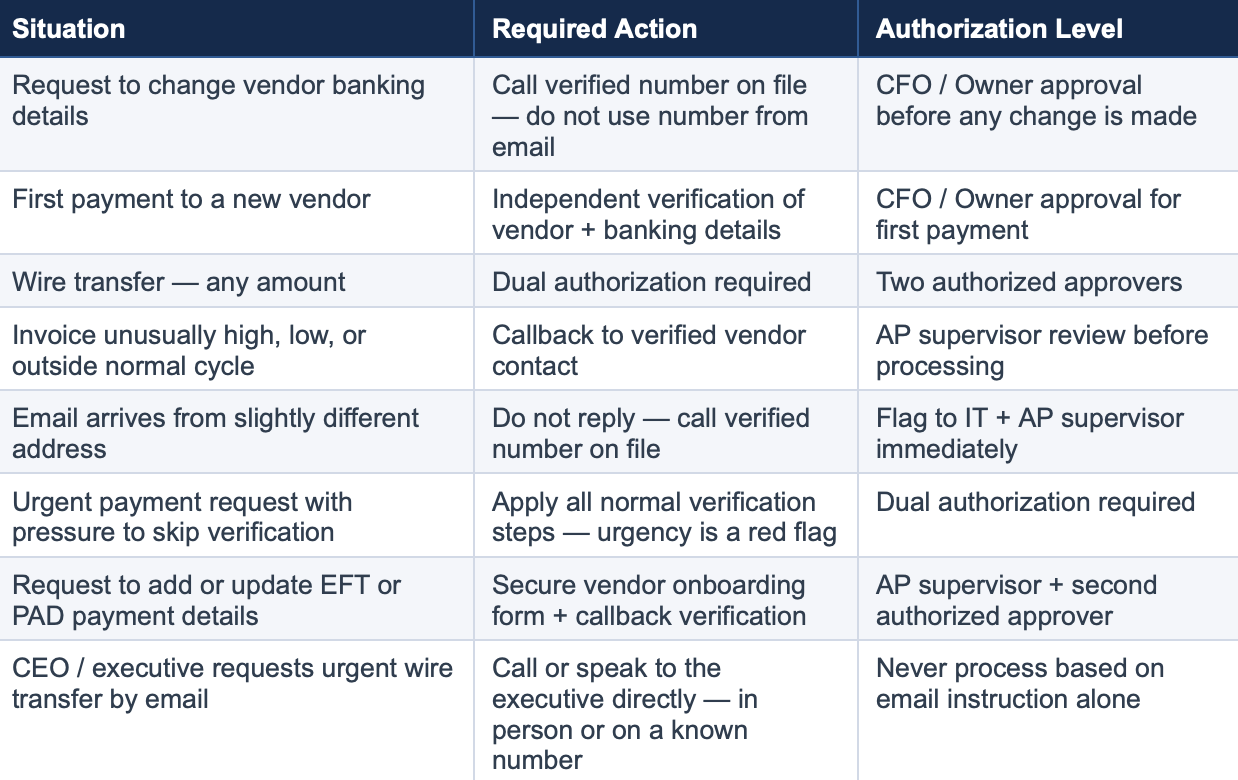
Use this table as a training aid and post it in your AP workspace. Every scenario that triggers a required callback is listed here.
Process and policy are your strongest defenses against payment fraud — but technology plays an important supporting role. The following technical controls should be in place for every business handling wire transfers and electronic payments.
This is non-negotiable. Your email accounts are the entry point for virtually every BEC and executive impersonation attack. If an attacker can gain access to a single email account — yours or your vendor's — they can cause significant financial damage. MFA on all email accounts means that even if a password is compromised, the attacker cannot access the account without a second factor.
This applies to every employee account in your organization, not just executives and finance staff. A compromised receptionist's email can be used to learn billing cycles and names that enable attacks on your AP team.
DMARC, DKIM, and SPF are email authentication protocols that verify that emails claiming to come from your domain actually originated there. When properly configured, they prevent fraudsters from spoofing your domain and sending emails that appear to come from your company's addresses. They do not prevent VEC attacks from a vendor's compromised account, but they do prevent attackers from impersonating your own organization's email.
💡 PCI DSS v4.0 requires organizations processing payment cards to implement DMARC email authentication — this applies to Canadian businesses operating under PCI DSS as well. Even if you are not subject to PCI DSS, implementing DMARC is a best practice for any Canadian organization that sends email. Ask your IT provider to verify your DMARC configuration.
Configure your email system to automatically flag or banner any email arriving from outside your organization. This simple, low-cost control creates a visual reminder for your team that an email they are reading came from an external source — which matters when a fraudster is impersonating an internal executive or a known vendor.
Modern email security tools can also flag domain lookalikes — email addresses that are very similar to known vendor or internal domains but not identical. These tools will not catch VEC attacks from a truly compromised account, but they catch many lower-sophistication BEC attempts.
Positive Pay is a fraud prevention service offered by many Canadian business banks — ask your bank whether it is available under this or a similar name such as Payments Canada fraud controls. For check payments, it works by having your bank compare each check presented for payment against a file of checks you have authorized. Any check that does not match is flagged for your review before it clears. For electronic payments, pre-authorized debit (PAD) controls allow you to specify which organizations can pull funds from your account.
Ask your bank whether these services are available and enabled on your business accounts. They add a meaningful layer of protection against both external fraud and internal misuse.
This is the most rapidly evolving and least understood area of payment fraud — and it fundamentally changes what your finance team can trust. AI tools can now clone a person’s voice from a short audio sample and generate a real-time phone call that sounds exactly like your CEO, your CFO, or a trusted vendor contact. They can generate deepfake video of an executive in a live video call — convincing enough that employees have approved large wire transfers while looking at what appeared to be their own boss on screen. In 2024, a finance employee transferred $25 million USD after a video call featuring deepfake versions of multiple colleagues. Incidents like this are accelerating globally as the technology becomes cheaper and easier to access.
The implication for your finance team requires a specific mindset shift: an incoming call — even from a number that looks familiar — is not verification. A video meeting with someone who looks and sounds exactly like your executive is not verification. Caller ID can be spoofed. Phone numbers can be spoofed. Deepfake audio and video can be generated in real time with no special equipment. None of these signals constitute reliable proof that you are speaking with who you think you are.
🚨 Critical rule: Do not act on any payment request based on an incoming phone call or video meeting — even if the caller ID looks correct, the voice sounds right, and the video looks real. Caller ID is spoofable. Deepfake audio and video are indistinguishable in real time. The only safe response is to hang up or end the meeting, then call outbound to the trusted number you have on file.
The only verification that reliably defeats deepfake fraud is one you initiate yourself — outbound, to a number in your own records. If someone calls requesting a wire transfer, hang up and call them back on the number you have on file. If a meeting invite arrives with an urgent request to approve a large payment, end the call and dial the person directly. Never use a number provided in the request itself. This outbound-only rule applies equally to vendors, executives, lawyers, your bank, and anyone else requesting payment action over the phone or in a meeting.
A legitimate executive, vendor, or colleague will understand a two-minute delay while you call them back. A fraudster running a deepfake call cannot survive that callback — because when you dial the real person’s trusted number, you will find they never contacted you.
📋 The Outbound-Only Rule: For any payment action triggered by a phone call or meeting, verification must flow outbound — hang up or end the meeting, then call back on the trusted number in your records. Never act on an inbound call regardless of caller ID, voice quality, or video. This single rule defeats both deepfake attacks and standard caller-ID spoofing simultaneously.
Beyond the outbound-only rule, establish a pre-agreed code word with your executives and key internal contacts — a word or phrase set up in person or through a separate secure channel, changed periodically, and spoken in any payment-related conversation to confirm the person is genuine. This adds a second layer of protection for high-value transfers even after you have called back on a trusted number. If the person cannot provide the code word, do not proceed.
⚠️ By mid-2024, an estimated 40% of BEC phishing emails were AI-generated. Real-time deepfake voice and video are now being actively deployed in direct calls to finance teams. A finance employee was deceived into transferring $25 million USD by a video call featuring AI-generated versions of multiple colleagues. This is no longer a future risk — it is happening now, and it is growing.
Speed matters more than anything else in payment fraud recovery. Once funds leave your account, they typically move through multiple accounts within hours and are often converted to cryptocurrency or wired overseas. Your window to recover funds is measured in hours, not days.
🚨 Do not try to contact the fraudster or negotiate with them. Do not send additional funds as a 'recovery fee' — this is a common secondary scam targeting businesses that have already been defrauded. Contact law enforcement and your bank only.
Standard commercial property or general liability policies typically do not cover wire fraud losses. Cyber liability insurance and crime insurance policies may provide coverage for social engineering fraud, including BEC. Review your coverage with your Canadian broker or insurer specifically for:
Note that many Canadian policies have specific requirements around controls that must be in place for coverage to apply. Implementing the controls in this guide — dual authorization, callback verification, written payment policies — may be required by your insurer and can reduce your premium. Ask your broker about the Canadian Crime Insurance Market's standard coverage for social engineering fraud.
Most payment fraud guidance focuses on external threats — vendor impersonation, executive spoofing from outside the organization. But one of the most overlooked risks in accounts payable is an internal one: what happens when the person requesting a payment or a banking change appears to be a colleague inside your own company?
Internal accounts can be compromised. An employee’s email account that has been hacked looks identical to the real thing. A phishing attack that captures a colleague’s Microsoft 365 credentials gives a fraudster full access to that person’s email, calendar, and Teams account — and the ability to send messages that appear completely legitimate from inside your organization. Fraudsters specifically target internal accounts at companies with active payment operations because a message from an internal address carries far more trust and urgency than one from an external vendor.
🚨 An urgent payment request from your CFO’s email, a Microsoft Teams message from your controller asking you to process a wire, or an email from a colleague saying “I’ll explain later, just send it” — these are all scenarios where a fraudster using a compromised internal account has caused real financial losses at real businesses. Internal does not mean safe.
The verification approach for internal requests mirrors what you would do for an external vendor — you simply cannot rely on the message channel alone. Apply the following steps any time you receive an unexpected or unusual payment request that appears to come from inside your organization:
Your AP team should feel empowered to push back on any payment request — internal or external — that skips verification. This should never feel like questioning a colleague’s integrity. It is a standard control that exists to protect the business and protect the employee from being implicated in a fraud they processed unknowingly. Give your team language they can use confidently:
📋 Suggested script: “I want to make sure I process this correctly — our policy requires a quick phone confirmation and a second approval before any payment goes out. I’ll call you on your direct line to confirm, and then get [name of second approver] to sign off. I just need two minutes. This is standard procedure for any payment request, even internal ones.”
Automatic verification and second approval are required any time an internal request includes any of the following:
✅ Good culture note: Make it clear to your entire team that following verification procedures is never an insult to a colleague — it is a protection for them too. If a colleague’s account is compromised, your verification call gives them the chance to catch it and protect themselves. No reasonable person objects to being asked “I just want to confirm it’s really you — can I call you on your direct line?”
Business Email Compromise (BEC) is a broad category of fraud where attackers impersonate a trusted person — an executive, a colleague, or a vendor — to get your team to send money or sensitive information. Vendor Email Compromise (VEC) is a specific and more dangerous subset where the attacker actually hacks your vendor's real email account and sends fraudulent payment instructions from it. With VEC, standard email security tools do not flag the message because it comes from a legitimate, authenticated account. Only a phone verification to a number you already have on file can reliably catch it.
Never update banking information based on an email request alone — not even if the email comes from the vendor's real address, not even if you have a long-standing relationship with that vendor. Their email may be compromised. Always call a verified number that you have on file from before the change request arrived. Never call a number provided in the email requesting the change. Treat every banking change request as potentially fraudulent until a voice confirmation with a trusted contact says otherwise.
Immediately. Call your bank the same day — the same hour if possible. Wire fraud recovery has a narrow window: funds can move through multiple accounts within hours and become unrecoverable. For any international transfer involving U.S. accounts, the FBI's Financial Fraud Kill Chain must be initiated within 72 hours. For domestic Canadian transfers, your bank's fraud team will initiate a wire recall — time is still critical. Do not wait until you have a complete investigation — contact your bank first, then law enforcement, then IT. Speed is everything.
No — small and mid-sized businesses are frequently targeted precisely because they are more likely to have informal payment processes, less training on fraud detection, and lower approval thresholds that a single employee can act on alone. Fraudsters research their targets. They know the name of your AP manager, who signs off on payments, and what your typical invoice amounts look like. Organizations of all sizes are at risk, and the controls described in this guide are specifically designed to be practical for smaller finance teams.
Yes — and the code word system works alongside a more fundamental rule your team must internalize: never act on a payment request based on an inbound call or video meeting alone. Caller ID is spoofable. Deepfake audio and video can impersonate your executives and vendors in real time with no visible tells. The safe response to any inbound payment request by phone or video is to hang up or end the meeting, then call back outbound on the trusted number you already have on file. If that outbound call confirms the request is genuine, a code word provides a second layer of assurance that you are speaking with the real person and not an AI-generated impersonation. The code word should be agreed on in person or through a separate secure channel, changed periodically, and required for any payment conversation involving a wire transfer or large EFT or PAD. If the person cannot provide it, do not proceed.
No technology will fully protect your business from wire transfer and payment fraud. Email security tools, spam filters, and DMARC authentication all help — but every single one of them can be bypassed by a fraudster who is operating from your vendor's legitimate, authenticated email account.
What cannot be bypassed is a finance team that has internalized one non-negotiable habit: pick up the phone. Call the verified number. Wait for confirmation before processing. Two minutes of friction on every banking change request is a small price for the certainty that your payment is going where you intend it to go.
The organizations that consistently avoid wire fraud losses are not those with the most sophisticated technology — they are those with the clearest procedures, the best-trained finance teams, and a culture where pausing to verify is the expected behavior, not the exception.
Want help building these controls into your business? Always Beyond Corp. works with businesses to implement the email security, authentication controls, and IT policies that support a strong payment fraud prevention posture. Contact us to discuss how we can help your team stay protected.
See exactly how your current IT setup measures up to our Hack Free standards. Enter your business email to receive:
