
Always Beyond
IT Solutions Team


If you manage a Microsoft 365 environment, you are already using Microsoft Entra ID, even if you have never heard the name. Entra ID is the cloud-based identity service that controls who can sign in to your organization's apps, email, and data. It replaced Azure Active Directory in 2023, and understanding what it does is essential for any business that relies on Microsoft 365.
This guide explains what Microsoft Entra ID is, how it differs from traditional Active Directory, what features are available at each licensing tier, and why it matters for your organization's security posture. Whether you are an IT administrator or a business owner trying to make sense of Microsoft's identity platform, this article covers everything you need to know.
Microsoft Entra ID is a cloud-based identity and access management (IAM) service built by Microsoft. It is the foundational product in the broader Microsoft Entra product family, and it handles authentication and authorization for every Microsoft cloud service, including Microsoft 365, Azure, and Dynamics 365 [1].
In practical terms, Entra ID is the system that verifies who you are when you sign in to Outlook, Teams, SharePoint, or any other Microsoft 365 application. It also controls what you are allowed to access based on your role, your device, your location, and other conditions.
Every Microsoft 365 tenant automatically includes a Microsoft Entra ID directory. If your organization uses Microsoft 365 Business Basic, Business Standard, Business Premium, or any Enterprise plan, you already have Entra ID running in the background. There is nothing to install or configure to start using it.
Microsoft renamed Azure Active Directory (Azure AD) to Microsoft Entra ID on July 11, 2023. The rename was purely cosmetic. No features, APIs, or functionality changed. If you see references to "Azure AD" in older documentation or scripts, they refer to the same service now called Microsoft Entra ID [1].
The rename was part of a broader effort to unify Microsoft's identity and network access products under the Microsoft Entra brand, which includes several additional services beyond Entra ID itself.
When a user attempts to sign in to a Microsoft 365 application, Entra ID handles the entire authentication process. Here is a simplified version of what happens behind the scenes:
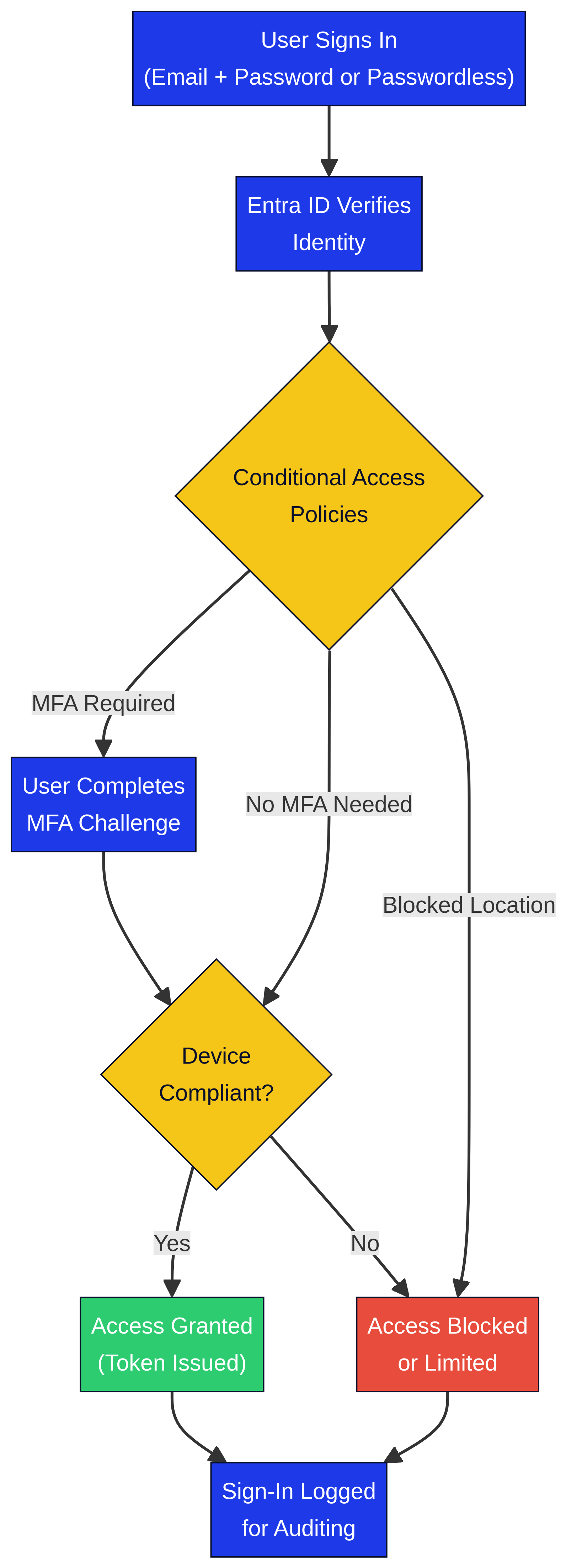
This process happens in seconds and applies to every sign-in across your Microsoft 365 environment, whether the user is in the office, at home, or on a mobile device.
Many IT professionals are familiar with Active Directory Domain Services (AD DS), the on-premises directory service that Microsoft introduced with Windows 2000. While Entra ID serves a similar purpose, it is a fundamentally different technology designed for the cloud [2].
| Feature | Active Directory (AD DS) | Microsoft Entra ID |
|---|---|---|
| Deployment | On-premises servers | Cloud-based (no servers to manage) |
| Authentication protocols | Kerberos, NTLM, LDAP | OAuth 2.0, SAML, OpenID Connect |
| Device management | Group Policy | Conditional Access + Microsoft Intune |
| Application support | On-premises apps, limited SaaS | Native SaaS integration, 3,000+ pre-integrated apps |
| User provisioning | Manual or Microsoft Identity Manager | Automated via cloud HR, SCIM, Entra Connect |
| Password management | Password policies (length, expiry, complexity) | Smart lockout, banned passwords, MFA, passwordless, self-service password reset |
| External collaboration | Separate forest for external users | Entra External ID (B2B) with managed lifecycle |
| Mobile device support | Requires third-party MDM | Native integration with Microsoft Intune |
| Management interface | Active Directory Users and Computers (on-prem console) | Microsoft Entra admin center (web portal) |
The most important distinction for small and medium-sized businesses is that Entra ID eliminates the need for on-premises domain controllers. You do not need to buy, maintain, or patch Windows Server hardware to manage user identities. Everything runs in Microsoft's cloud.
Yes. Many organizations run a hybrid identity configuration where on-premises Active Directory syncs with Microsoft Entra ID using a tool called Microsoft Entra Connect (formerly Azure AD Connect). This allows users to sign in to both on-premises resources and cloud applications with the same credentials [2].
Hybrid identity is common during cloud migrations or in organizations that still rely on legacy applications that require Kerberos or LDAP authentication.
Microsoft Entra ID is just one product within the broader Microsoft Entra family. The full product family covers identity, access, and network security across four maturity stages [1]:
| Product | What It Does |
|---|---|
| Microsoft Entra ID | Core identity and access management (authentication, SSO, MFA, Conditional Access) |
| Microsoft Entra Domain Services | Managed LDAP, Kerberos, and Group Policy for legacy apps in the cloud |
| Microsoft Entra Private Access | Secure access to private apps and corporate networks without VPN |
| Microsoft Entra Internet Access | Secure web gateway for internet and SaaS traffic |
| Microsoft Entra ID Governance | Automated access reviews, entitlement management, and lifecycle workflows |
| Microsoft Entra ID Protection | Risk-based sign-in detection and automated remediation |
| Microsoft Entra Verified ID | Decentralized identity verification based on open standards |
| Microsoft Entra External ID | B2B collaboration and customer identity management (CIAM) |
| Microsoft Entra Workload ID | Identity management for applications, services, and containers |
For most small and medium-sized businesses, Microsoft Entra ID is the product you interact with daily. The other products in the family become relevant as your security requirements grow or as you adopt more advanced cloud architectures.
Microsoft Entra ID is available in several licensing tiers. The tier you have determines which features are available to your organization [3].
| Tier | How You Get It | Key Features |
|---|---|---|
| Entra ID Free | Included with any Microsoft 365 or Azure subscription | User and group management, basic SSO, self-service password change, basic security reports |
| Entra ID P1 | Included with Microsoft 365 Business Premium, M365 E3, or standalone | Conditional Access, self-service password reset, hybrid identity (Entra Connect), dynamic groups, Microsoft Entra application proxy |
| Entra ID P2 | Included with Microsoft 365 E5 or standalone | Everything in P1 plus Identity Protection (risk-based policies), Privileged Identity Management (PIM), access reviews |
| Entra Suite | Add-on (requires P1) | Combines Private Access, Internet Access, ID Governance, ID Protection, and Verified ID |
If your organization uses Microsoft 365 Business Premium, you already have Entra ID P1 included. This gives you access to Conditional Access, which is one of the most important security features available in the Microsoft ecosystem. Conditional Access lets you create rules like "require MFA for all sign-ins outside the office" or "block access from countries where we do not operate."
For organizations that need risk-based sign-in detection or Privileged Identity Management, upgrading to P2 (typically through Microsoft 365 E5) is the next step.
Even if you never open the Microsoft Entra admin center, several Entra ID features directly affect your organization's security and productivity.
SSO allows your users to sign in once and access all of their Microsoft 365 applications, plus thousands of third-party SaaS applications, without entering separate credentials for each one. Entra ID supports SSO for over 3,000 pre-integrated applications, including Salesforce, Zoom, Slack, and Adobe [1].
MFA requires users to verify their identity with a second factor, such as a push notification on Microsoft Authenticator, a phone call, or a FIDO2 security key, in addition to their password. Entra ID supports multiple MFA methods and can enforce MFA through Conditional Access policies. If you are not already using MFA across your organization, it should be your top security priority. Learn more in our guide on how to set up MFA in Microsoft 365.
Conditional Access is the policy engine that sits at the heart of Entra ID's security model. It evaluates every sign-in against a set of conditions (user, device, location, risk level) and enforces the appropriate access controls (allow, block, require MFA, require compliant device). Conditional Access is available with Entra ID P1 and above [3].
SSPR allows users to reset their own passwords without calling the IT help desk. This reduces support ticket volume and gets users back to work faster. SSPR is available with Entra ID P1 and above.
The Microsoft Entra admin center is the web-based portal where administrators manage users, groups, applications, and security policies. You can access it at entra.microsoft.com [1].
The admin center replaces the older Azure Active Directory portal in the Azure Portal. While you can still access Entra ID settings through the Azure Portal, Microsoft recommends using the dedicated Entra admin center for identity management tasks.
Yes. Microsoft renamed Azure Active Directory to Microsoft Entra ID on July 11, 2023. The service, features, APIs, and functionality are identical. The name change was part of a broader rebranding effort to unify Microsoft's identity products under the Entra brand [1].
No. If your organization has a Microsoft 365 subscription, you already have Microsoft Entra ID. It runs entirely in the cloud and requires no on-premises infrastructure. The only scenario where you install software is if you use Microsoft Entra Connect to sync an on-premises Active Directory with Entra ID.
Yes, but only the Free tier. Microsoft 365 Business Basic includes Entra ID Free, which provides basic user management and SSO. To get Conditional Access, self-service password reset, and other advanced features, you need Entra ID P1, which is included with Microsoft 365 Business Premium [3].
Microsoft Entra is the name of the entire product family, which includes nine products covering identity, access, and network security. Microsoft Entra ID is one specific product within that family. It is the core identity and access management service that handles authentication and authorization [1].
Whether you manage Entra ID yourself or work with a managed service provider, these practices will help you get the most out of the platform.
Managing Microsoft Entra ID effectively requires a clear understanding of your licensing tier, your security policies, and how identity fits into your broader IT strategy. For many small and medium-sized businesses, the complexity of Conditional Access policies, hybrid identity configurations, and ongoing security monitoring can be overwhelming.
Always Beyond provides fully managed Microsoft 365 services for growing businesses across Calgary and beyond, including Entra ID configuration, Conditional Access policy design, and ongoing identity security monitoring. Book a free IT strategy call to see how we can help you get the most out of your Microsoft investment.
See exactly how your current IT setup measures up to our Hack Free standards. Enter your business email to receive:
